Billing & Plans
Everything you need to know about Neotask pricing, how the platform works, and what you're paying for.
How Neotask Works
Neotask is a platform, not a traditional SaaS with hard usage caps. You are paying for access to a unified agent orchestration system: the software, infrastructure, and compute that powers your AI agents across every channel, integration, and automation.
Unlike services that advertise "20x usage" or bundle a fixed number of agent runs, Neotask gives you the full platform with every feature included in your plan. Your subscription covers the software and an initial allocation of AI token usage. Any usage beyond that allocation is billed at transparent usage rates.
What your subscription covers:
- Full access to the Neotask desktop app, web dashboard, and all platform features
- Unified agent management across 14+ messaging channels
- Voice control, automation scheduling, smart routing, and team orchestration
- All 55+ built-in skills and tools
- All supported AI model providers (Anthropic, OpenAI, Google, DeepSeek, OpenRouter)
What usage fees cover:
- The actual AI token consumption (input and output tokens) your agents use when processing tasks
- Flat scheduled-task fees for real autonomous or automation runs that fire later from saved schedules
- Usage is metered transparently so you only pay for what your agents consume and the scheduled work they actually execute
Plans
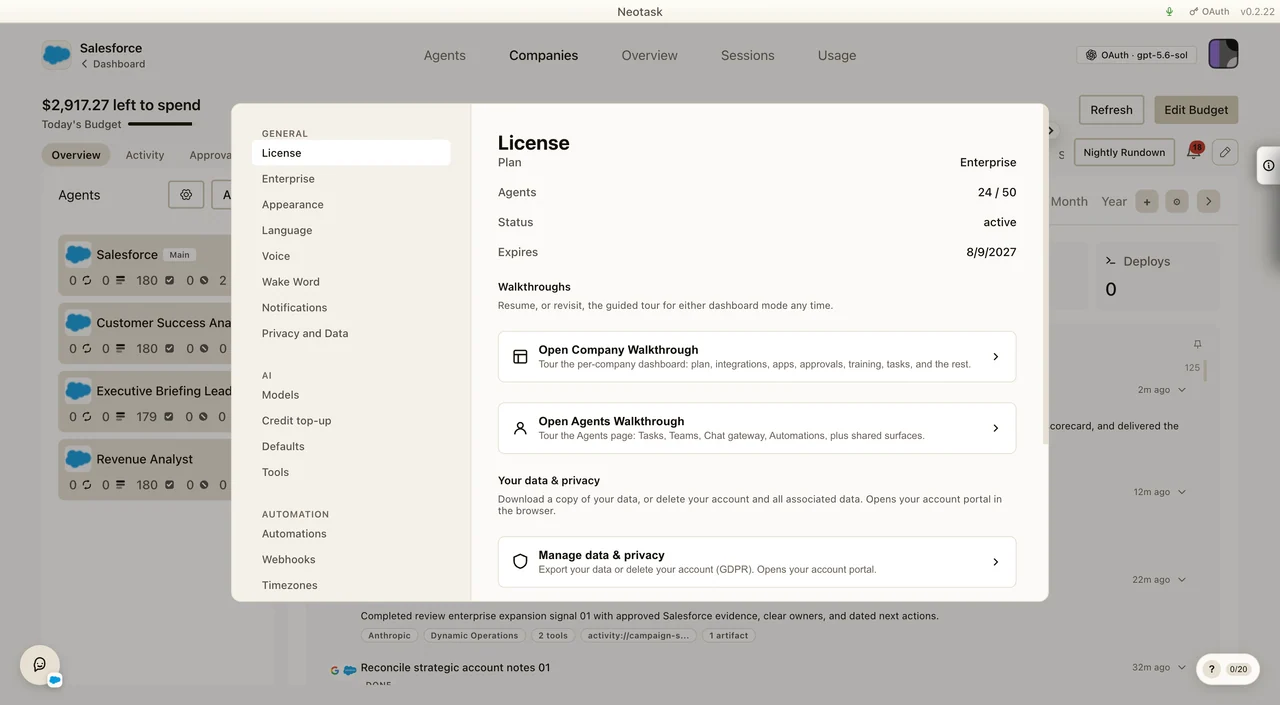
Check Your Current Plan
- Open Settings.
- Select License under General.
- Read the plan, agent count, status, and expiration date at the top of the screen.
The License screen is also where you can reopen either product walkthrough and reach the account data controls.
Free
- Price: $0/month + usage coverage
- Message quota: First
10messages/events as a one-time intro allowance, then5messages/events per user-local calendar day. - Usage coverage: Free users must cover hosted model/token usage with Neotask credits or their own provider keys. Local models on your computer are free and do not count against the message quota. Every account still starts with the standard
$10starter credit grant. - Allowed surfaces: Main chat mode, boards, coding workflows, app connection flows, and connected-app usage inside allowed chat/boards/coding interactions.
- Locked surfaces: Company operation, company tasks, user-created automations, scheduled jobs, cron jobs, reminders, and custom agent creation.
- Company onboarding: Free users can onboard or preview a company, but they cannot actually run company tasks or automations unless they upgrade to at least an Individual subscription.
- Overage: Free users get no overage. If credits or provider balance are exhausted, usage hard-stops until they add credits, fix provider billing, or upgrade.
For the detailed Free-plan contract, see Free Plan.
Individual
- Price: $50/month + usage
- What you get: Personal access to the Neotask desktop app and platform with no company or sector slots included.
- Included setup tasks: 25 one-time setup tasks before flat
$1scheduled-task fees begin.
Business
- Price: $100/month + usage
- What you get: Everything in Individual, plus 1 company or sector and support for paid employee seats.
- Employee seats: $50/month each for base access. Giving a seat company access (collaborator or manager) is a separate +$50/month upgrade, so a company-access seat totals $100/month.
- Included setup tasks: 50 one-time setup tasks before flat
$1scheduled-task fees begin.
Enterprise
- Price: $200/month + usage
- What you get: Everything in Business, plus 2 companies or sectors included.
- Additional companies or sectors: $100/month each
- Employee seats: $50/month each for base access. Giving a seat company access (collaborator or manager) is a separate +$50/month upgrade, so a company-access seat totals $100/month.
- Included setup tasks: 50 one-time setup tasks before flat
$1scheduled-task fees begin. - Optional setup engagement: Dedicated onboarding is available as a one-time add-on for customers who want rollout help.
All paid plans are still usage-based. You can run in hosted credits mode or with your own provider keys. Hosted credits can be topped up manually or automatically, and BYOK keeps provider billing on your own account.
For example, a scheduled autonomy task that takes ~3 hours to complete and consumes $10 in provider usage would cost $11 total if it qualifies for a flat task fee: $10 for raw AI compute plus $1 for the scheduled task execution. If you are still inside your included setup-task allowance, the flat $1 fee is waived, but token and provider usage still apply.
For the complete pricing breakdown, see the detailed usage rate schedule.
Scheduled Task Fees
Neotask bills $1 per real billable scheduled execution on top of normal usage billing.
This applies to:
- autonomous company plan tasks
- autonomous company dynamic tasks
- saved agent automations that later fire on schedule
- schedules created in chat, but only when the saved schedule actually fires later
This does not apply to:
- heartbeats
- one-off chat turns
- tools inside a task
- approvals by themselves
- generic reminder or training crons unless they are upgraded into a billable automation lane
One scheduled execution is still just one $1 fee, even if it performs many tool calls.
A scheduled execution whose model calls all ran on a local model on your computer is currently not charged. Its $1 fee is taken when the run starts and credited back after the run's usage shows that every model call ran locally, usually within about half an hour. If the run itself fell back to a hosted model, the fee stays. Hosted model calls made by sub-agents the run starts are billed as normal usage and do not affect this fee.
Included Setup Tasks
Paid plans include a one-time setup cushion so you can tune automations before flat task-fee deductions begin:
- Individual: 25 included setup tasks
- Business: 50 included setup tasks
- Enterprise: 50 included setup tasks
These included tasks only waive the flat $1 scheduled-task fee. They do not waive provider usage, model-token usage, or any normal platform markup.
They are not monthly resets. They are a startup allowance.
Credits, BYOK, And Billing Readiness
Neotask still uses the existing credits system for scheduled-task fees.
- Hosted credits mode: provider usage and scheduled-task fees are both funded through credits.
- BYOK mode: provider usage goes to your own provider account, but flat scheduled-task fees and any platform usage charges still use Neotask credits.
For autonomous companies and billable automations, Neotask requires billing readiness:
- saved payment method
- automatic top-up enabled
- daily budget configured
Automatic top-ups will never exceed the remaining daily budget headroom for that day.
Add Credits Or Update Your Payment Method
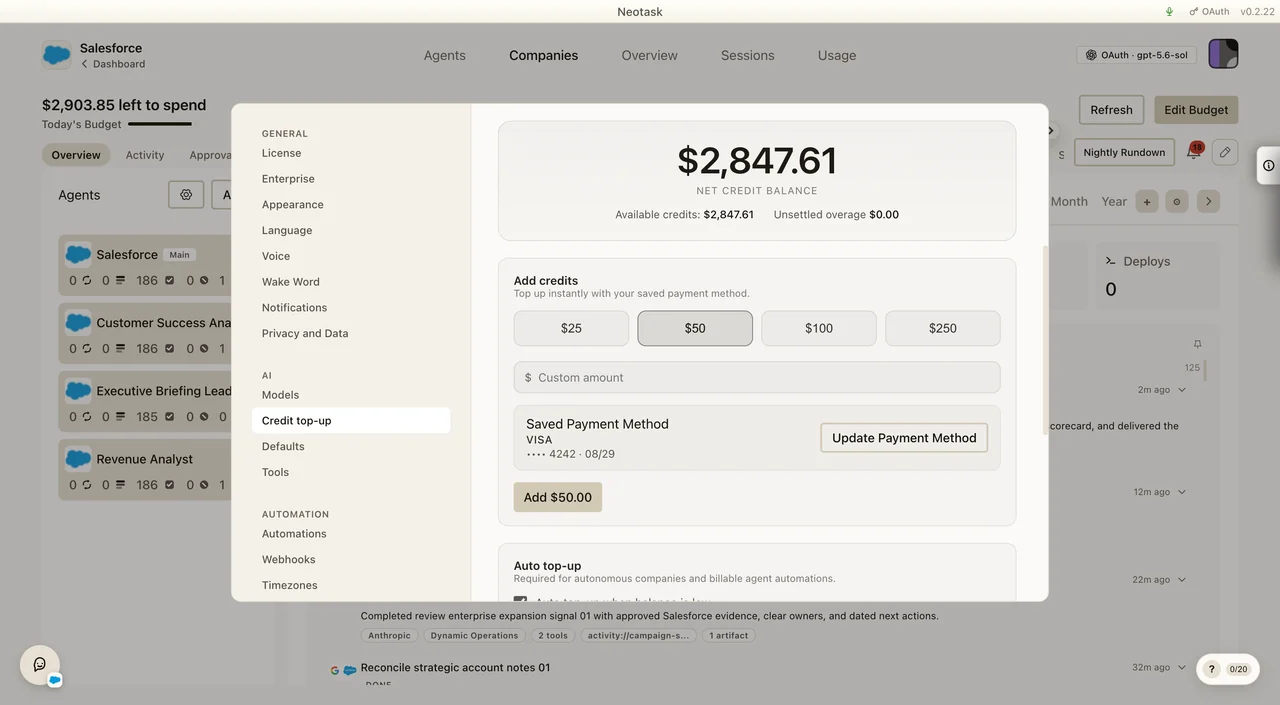
- Open Settings.
- Select Credit top-up under AI.
- Choose a preset amount or enter a custom amount.
- Use Update Payment Method if the saved card needs to change.
- Click the button showing the selected amount to complete the top-up.
Configure Auto Top-Up And A Daily Budget
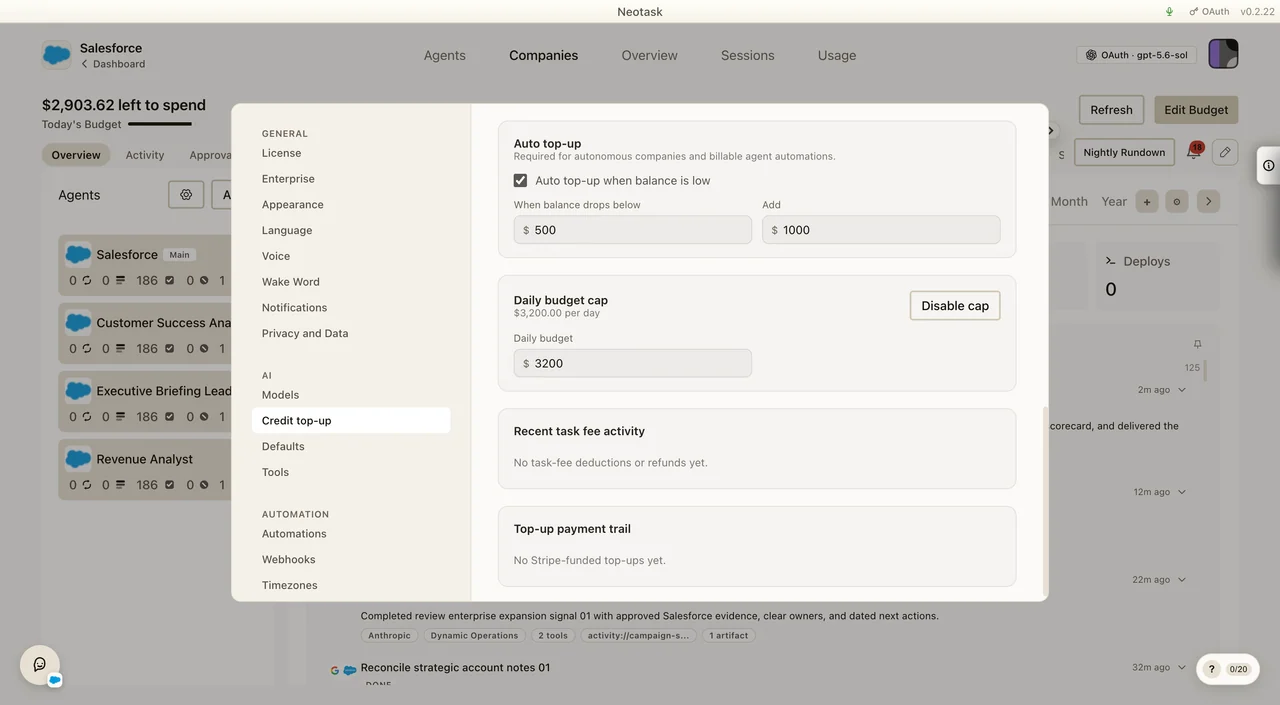
- Stay on Settings → AI → Credit top-up.
- Turn on Auto top-up when balance is low.
- Enter the balance threshold and the amount to add.
- Set the daily budget cap for autonomous companies and billable agent automations.
No Task-Fee Overage
Normal usage overage can follow its own plan rules, but scheduled task fees do not continue once your billable task-spend balance is gone.
After the included setup-task allowance is exhausted:
- if your balance is positive, a billable scheduled run can start
- if your balance is $0 or negative, that run is blocked before launch
- the schedule is paused, not deleted
- once credits are restored, the same automation or schedule becomes runnable again automatically
This keeps autonomous work predictable instead of silently digging deeper into overage.
Why This Model
Traditional AI agent services charge flat fees for limited runs or cap you at a fixed number of agents. Neotask takes a different approach:
- You pay for the platform: the unified orchestration layer, the desktop app, voice control, channel integrations, automation engine, and every tool and skill.
- You cover your own token usage: the actual AI compute your agents consume. This is metered transparently so you never pay for idle capacity or artificial limits.
- Enterprise scales with you. It adds multi-company capacity and employee-seat expansion without forcing separate subscriptions for every company slot.
This model keeps costs predictable for light users and scales efficiently for teams running hundreds of agents at once.
Payment Methods
| Method | Details |
|---|---|
| Credit/Debit Card | Visa, Mastercard, and Amex via Stripe |
| iOS In-App Purchase | Available through the App Store (powered by RevenueCat) |
| Enterprise Invoicing | Custom invoicing available for Enterprise plans |
Card changes for hosted credits happen in Settings → AI → Credit top-up. The saved card appears inside the Add credits panel beside Update Payment Method.
Managing Your Subscription
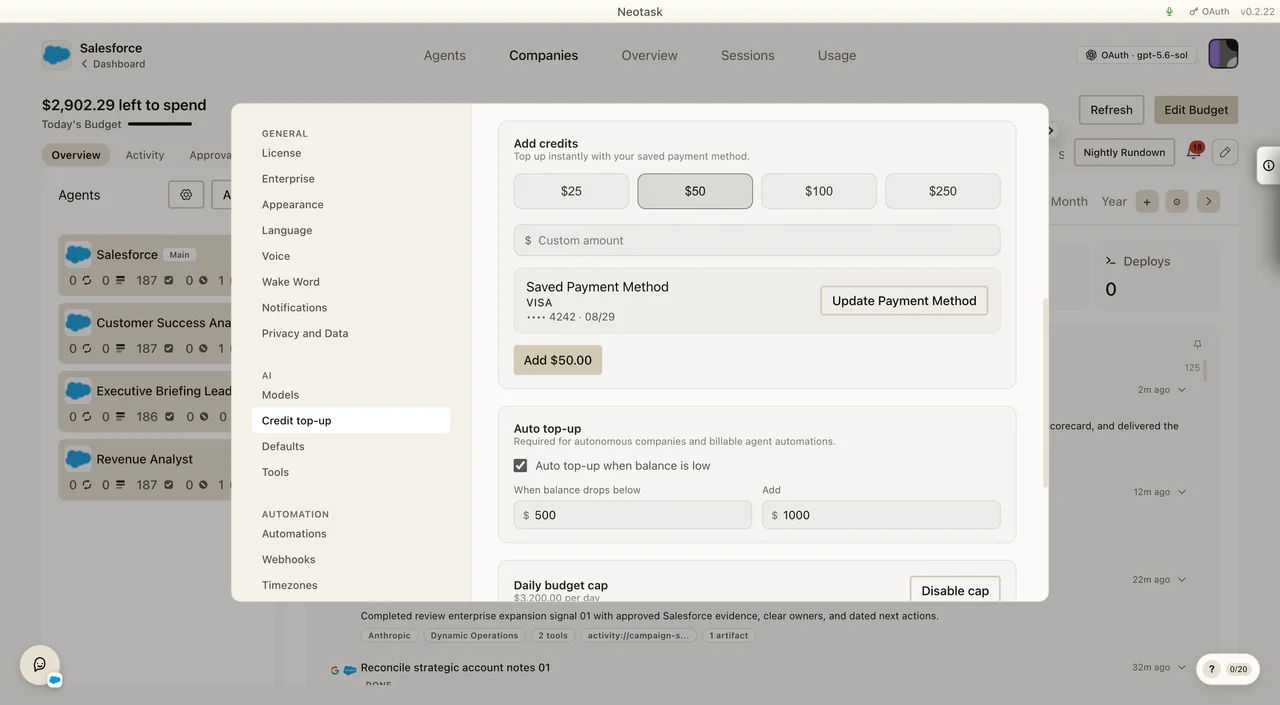
- Open Settings from the avatar menu in the upper-right corner
- Use General → License to check the current plan and status
- Use AI → Credit top-up to manage the saved payment method, add credits, and configure auto top-up
- Use AI → Models to choose how models are connected
- Set a daily budget before you rely on autonomous companies or scheduled automations
- Cancel anytime. You retain access until the end of your current billing period.
- No long-term contracts required
API Keys & Provider Access
Neotask supports two modes for handling AI provider access:
System Key Mode (Default)
- Use Neotask's managed API infrastructure
- Token usage is tracked and billed through your plan
- No setup required; works out of the box
BYOK Mode (Bring Your Own Keys)
- Use your own API keys from supported providers
- Supported providers: Anthropic, OpenAI, Google AI, OpenRouter, DeepSeek
- Keys are stored with AES-256-GCM encryption
- Full control over which models you use
- Base token costs go directly to your provider, but a 20% platform fee and any applicable automation markup are still deducted from your Neotask credit balance
Budget Controls
Stay in control of your AI spending with built-in budget management:
- Set daily spending limits (global or per-agent)
- Auto-shutoff when budget is exceeded
- Budget-aware auto top-up caps so autonomous replenishment never exceeds the remaining daily budget headroom for that day
- Task-fee launch blocking when scheduled work reaches a zero or negative task-spend balance
- Real-time usage tracking so there are no surprises
- Budget snapshots and history for auditing
- Configurable alerts to notify you before limits are reached
Usage Tracking
Neotask provides detailed visibility into your usage and costs:
Open Usage from the main navigation to review model activity and cost by day. Select a row for its provider, model, agent, and session details.
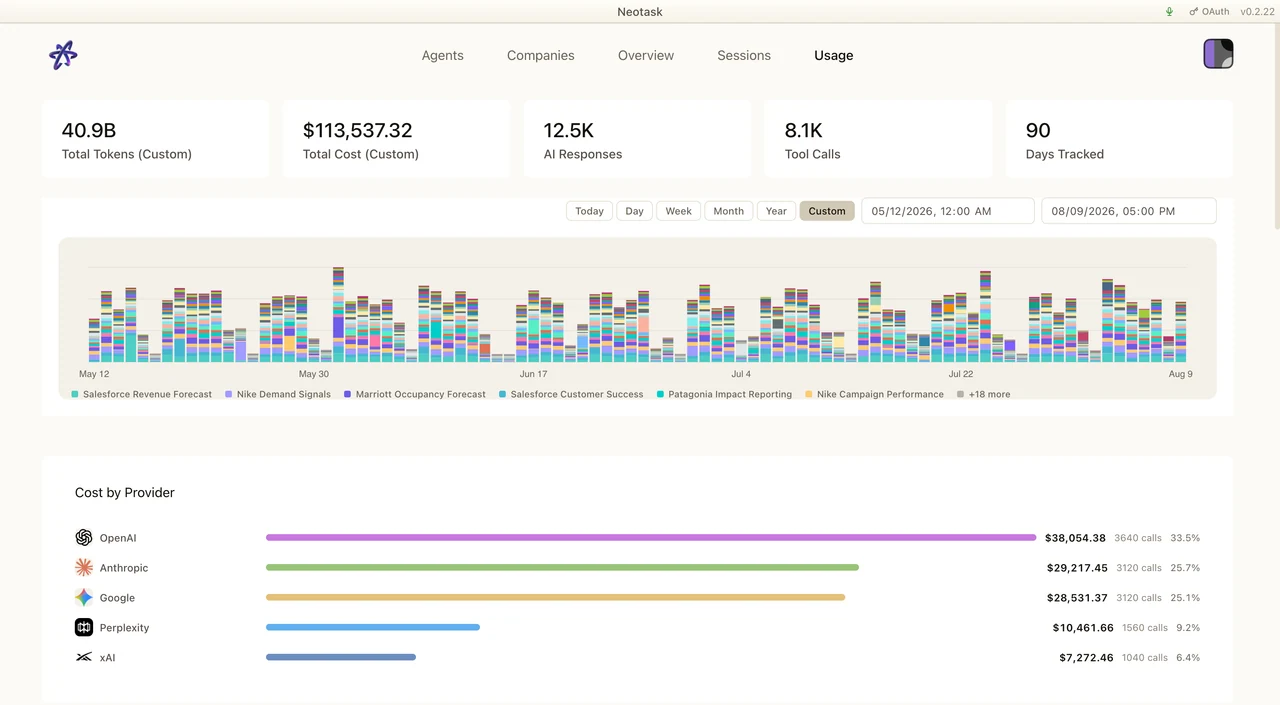
- Token-level tracking: input, output, cache read, and cache write tokens
- Scheduled-task execution records with execution ids, scope ids, and billing status
- Task-fee credit-backs if reconciliation later shows a run failed or became non-billable
- Payment-linked allocation trails that show which top-up lot funded which task fee
- Downloadable billing PDFs for task executions and payment-lot statements
- Cost breakdown by model, provider, agent, channel, and date
- Hourly drill-down for today's usage
- 30-day rolling usage charts for trend analysis
- CSV/JSON export for external analysis and reporting