Usage Rate Breakdown
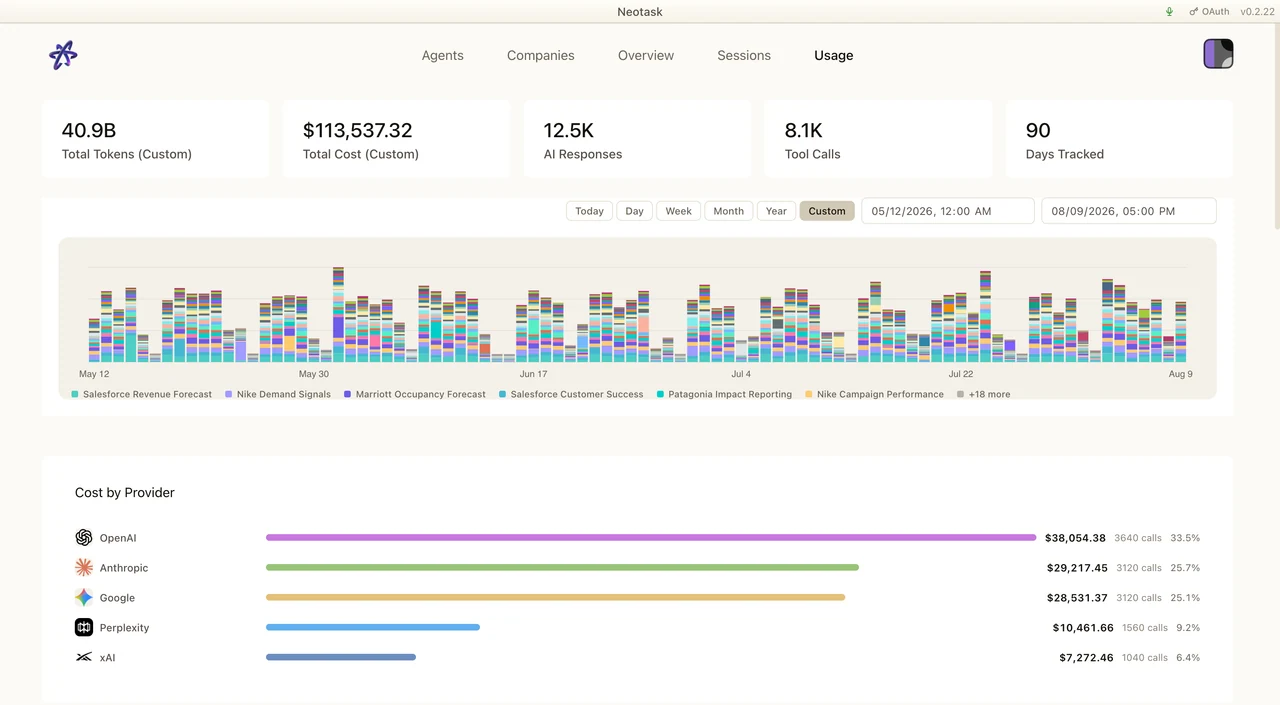
Read A Usage Record
- Open Usage.
- Choose the time range.
- Review cost by provider, model, agent, and company.
- Open a session when you need the request and tool history behind a charge.
This page details exactly how Neotask calculates usage-based charges. All users start with $10 in one-time signup credits that are consumed by usage. Understanding these rates helps you estimate costs and manage your credit balance effectively.
For an overview of plans and how billing works, see Billing & Plans.
How Usage Is Calculated
Every time your agent processes a message, it consumes AI tokens (input and output). The cost of those tokens depends on which AI model your agent uses. The system tracks four types of tokens separately, each with its own rate:
- Input tokens: the prompt and context sent to the model
- Output tokens: the response the model generates
- Cache read tokens: tokens served from prompt cache (cheaper than input)
- Cache write tokens: tokens written into prompt cache for future reuse
Token Cost Formula
Cost = (input tokens / 1,000,000) x input rate
     + (output tokens / 1,000,000) x output rate
     + (cache read tokens / 1,000,000) x cache read rate
     + (cache write tokens / 1,000,000) x cache write rate
Source: server/src/config/modelPricing.ts
AI Model Token Rates
These are the per-token rates for each supported AI model. All rates are in USD per 1 million tokens.
Anthropic Claude
| Model | Input | Output | Cache Read | Cache Write |
|---|---|---|---|---|
| Claude Opus 4.6 | $15.00 | $75.00 | $1.50 | $18.75 |
| Claude Sonnet 4.5 | $3.00 | $15.00 | $0.30 | $3.75 |
| Claude Haiku 4.5 | $0.80 | $4.00 | $0.08 | $1.00 |
| Claude 3.5 Sonnet | $3.00 | $15.00 | $0.30 | $3.75 |
| Claude 3.5 Haiku | $0.80 | $4.00 | $0.08 | $1.00 |
| Claude 3 Opus | $15.00 | $75.00 | $1.50 | $18.75 |
| Claude 3 Sonnet | $3.00 | $15.00 | $0.30 | $3.75 |
| Claude 3 Haiku | $0.25 | $1.25 | $0.03 | $0.30 |
OpenAI
| Model | Input | Output | Cache Read | Cache Write |
|---|---|---|---|---|
| GPT-4o | $2.50 | $10.00 | $1.25 | $2.50 |
| GPT-4o Mini | $0.15 | $0.60 | $0.075 | $0.15 |
| GPT-4 Turbo | $10.00 | $30.00 | $5.00 | $10.00 |
| GPT-4 | $30.00 | $60.00 | $15.00 | $30.00 |
| o1 | $15.00 | $60.00 | $7.50 | $15.00 |
| o1-mini | $3.00 | $12.00 | $1.50 | $3.00 |
| o3-mini | $1.10 | $4.40 | $0.55 | $1.10 |
Google Gemini
| Model | Input | Output | Cache Read | Cache Write |
|---|---|---|---|---|
| Gemini 2.0 Flash | $0.10 | $0.40 | $0.025 | $0.10 |
| Gemini 1.5 Pro | $1.25 | $5.00 | $0.3125 | $1.25 |
| Gemini 1.5 Flash | $0.075 | $0.30 | $0.01875 | $0.075 |
Source: server/src/config/modelPricing.ts lines 8-42
Platform Fees & Markups
There are several distinct fees that may apply depending on how your agent is being used. These are not a single flat rate; each applies in different situations.
1. Credit Mode Markup (System Key): 20%
When using Neotask's managed API keys (System Key mode), a 20% markup is applied on top of the raw token cost. This covers API key management, automatic failover between providers, model routing, and infrastructure.
If you use BYOK mode (Bring Your Own Keys), the base token cost goes directly to your AI provider. However, the 20% platform fee still applies and is deducted from your Neotask credit balance. BYOK saves you the base API cost (since you pay your provider directly), but the platform fee covers infrastructure, routing, failover, and orchestration.
Source: server/src/config/modelPricing.ts line 53, CREDIT_MODE_MARKUP_PCT = 0.20
2. Overage Platform Fee (Varies)
When your usage exceeds your included credit pool, the remaining cost becomes overage. A platform fee is applied on top of the overage amount. The rate depends on your plan tier:
| Tier | Overage Fee |
|---|---|
| Individual | 25% |
| Business | 15% |
| Enterprise | 10% |
The overage fee is only charged on the amount that exceeds your credit pool. Usage within your pool has no additional fee.
Overage is automatically charged to your card when the unsettled amount reaches $10 (Stripe minimum charge: $0.50).
Source: server/src/config/planConfig.ts, overageFeePct and overageChargeThreshold
3. Automation Markup: Progressive 50% Down to 33%
When your agents run automated jobs (scheduled tasks, cron jobs, recurring automations), an additional automation markup is applied on top of the token cost. This is because automated agents replace manual work. They run unattended, on schedule, handling tasks that would otherwise require employees.
The automation markup uses progressive brackets (like income tax). You pay a higher rate on your first dollars of automated usage and a lower rate as your automated spending grows. There are no cliff effects; each dollar is charged at its bracket rate only.
| Cumulative Automated Spend (per billing cycle) | Marginal Markup Rate |
|---|---|
| $0 - $10 | 50% |
| $10.01 - $25 | 45% |
| $25.01 - $50 | 40% |
| $50.01 - $100 | 37% |
| $100.01+ | 33% |
Source: server/src/config/automationMarkup.ts lines 38-44, DEFAULT_AUTOMATION_BRACKETS
4. Coding Task Markup: Flat 50%
Automated jobs that involve coding tools (file reads, writes, code execution, bash commands) are charged at a flat 50% markup. The progressive reduction does not apply to coding tasks; it is always 50% regardless of cumulative spend.
Coding tools: exec, read, write, bash, code
Source: server/src/config/automationMarkup.ts line 49, CODING_TASK_MARKUP_RATE = 0.50
How Costs Stack
These fees can stack depending on the situation:
Interactive chat (System Key mode):
- Raw token cost + 20% credit mode markup
- No automation markup (not automated)
Interactive chat (BYOK mode):
- Raw token cost paid to your provider + 20% platform fee deducted from credits
Automated cron job (System Key mode):
- Raw token cost + 20% credit mode markup + automation markup (50%-33%)
Automated coding task (System Key mode):
- Raw token cost + 20% credit mode markup + 50% coding task markup
Automation Billing Example
A scheduled cron job runs daily. The AI agent takes about 2-3 hours to complete its work. The job consumes $10 in raw tokens (the actual cost to the AI provider).
Breakdown:
- Token cost: $10 (passed through to the AI provider; this is what the compute costs)
- Automation markup: $10 x 50% = $5 (platform fee for running the job unattended)
- Total charge: $15
The $10 covers the actual AI compute your agent consumed. The $5 is the automation fee. The platform ran the job on schedule, monitored execution, handled retries, and delivered results, all without anyone having to be at a computer.
Why automation costs more: Automated agents replace human labor. A cron job that checks your analytics every morning, drafts reports, monitors inventory, or processes incoming orders is doing work that would otherwise require a person's time. The automation markup reflects the value of that unattended execution, and it decreases the more you automate, rewarding scale. A tenant spending $100+/cycle on automated jobs pays only 33% markup instead of 50%.
Top-Up Credits
You can purchase additional credits at any time to prepay for usage:
- Minimum top-up: $5
- Maximum top-up: $10,000
- Credits never expire. They remain in your account until used.
- Auto top-up: Optionally configure automatic top-ups when your balance drops below a threshold (default: $2 balance triggers a $10 top-up)
Top-up credits are added to the same balance as your signup credits. All credits draw from a single balance. When your balance hits $0, your agent is paused unless you top up or enable overage billing.
Source: server/src/services/overageCharger.ts, server/src/services/balanceService.ts
Credit Deduction Order
When your agent completes a task, the cost is deducted in this order:
- Credit balance (your $10 one-time signup grant plus any top-ups, all in a single balance that does not reset)
- Overage (if enabled, charged to your card when the unsettled amount reaches $10)
Your credit balance is consumed first. When it reaches $0, your agent is paused unless overage is enabled. With overage enabled, usage continues and is charged to your card automatically.
Source: server/src/services/balanceService.ts lines 240-286
Budget Controls
Enterprise users have built-in budget enforcement:
- Global daily budget: Default $500/day (configurable). When exceeded, the agent gateway automatically shuts down to prevent runaway costs.
- Per-agent spend limits: Set a daily cap for each individual agent. When an agent hits its limit, its sessions are automatically paused.
- Auto-shutoff: Configurable. Enable or disable automatic gateway shutdown on budget exceed.
- Real-time enforcement: Budget is checked every 30 seconds.
Source: Neotask-Electron/src/main/budgetEnforcer.ts, Neotask-Electron/src/main/agentSpendLimitStore.ts
Viewing Your Usage
The period chart shows how cost changes across the selected date range. Use it to locate a spike before opening the provider, agent, or session breakdown beneath it.

Track all of this in real time from the Usage page in the desktop app:
- Token-level breakdown by model, provider, agent, channel, and date
- Cost breakdown: input, output, cache read, cache write costs shown separately
- Time granularity: today, last 24h, 7 days, 30 days, 365 days, or custom range
- Per-agent attribution: see exactly which agent is consuming what
- Per-channel attribution: cost breakdown by messaging channel
- Per-provider attribution: cost by AI provider (Anthropic, OpenAI, Google)
- CSV/JSON export for external analysis
See Billing & Plans for more on managing your subscription.