Integrations
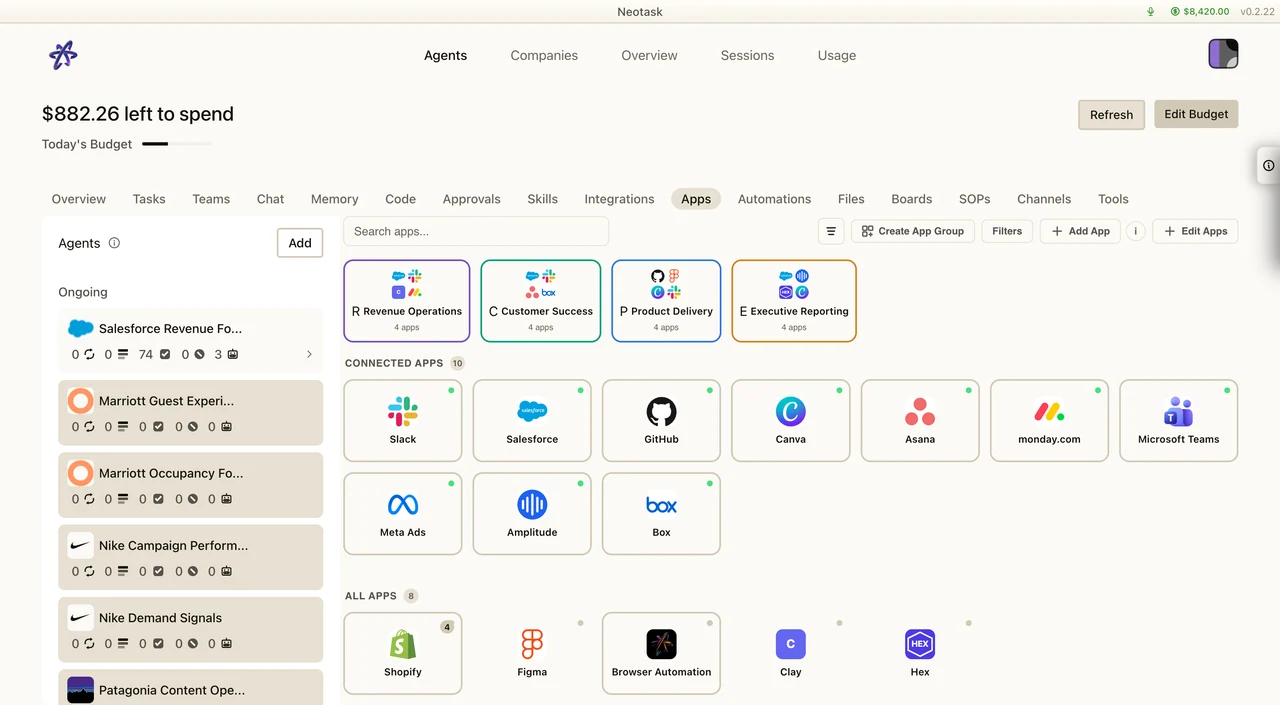
Connect An App
- Open Apps.
- Search for the service you need.
- Open it and choose the available authentication method.
- Finish authorization and return to Neotask.
- Confirm that the service appears under connected apps.
Overview
Neotask connects to 1200+ services, from Google Workspace (via the Integrations tab) to 1200+ external apps via MCP (via the Apps tab). This page covers all available integrations and how to set them up.
There are two types of integrations:
- Built-in integrations = native API wrappers (Google Workspace, AI providers, messaging platforms). Configured in Agents → Integrations tab.
- App integrations = 1200+ external service connectors (Slack, Notion, GitHub, Stripe, and more). Configured in Agents → Apps tab.
Google Workspace (25 Services)
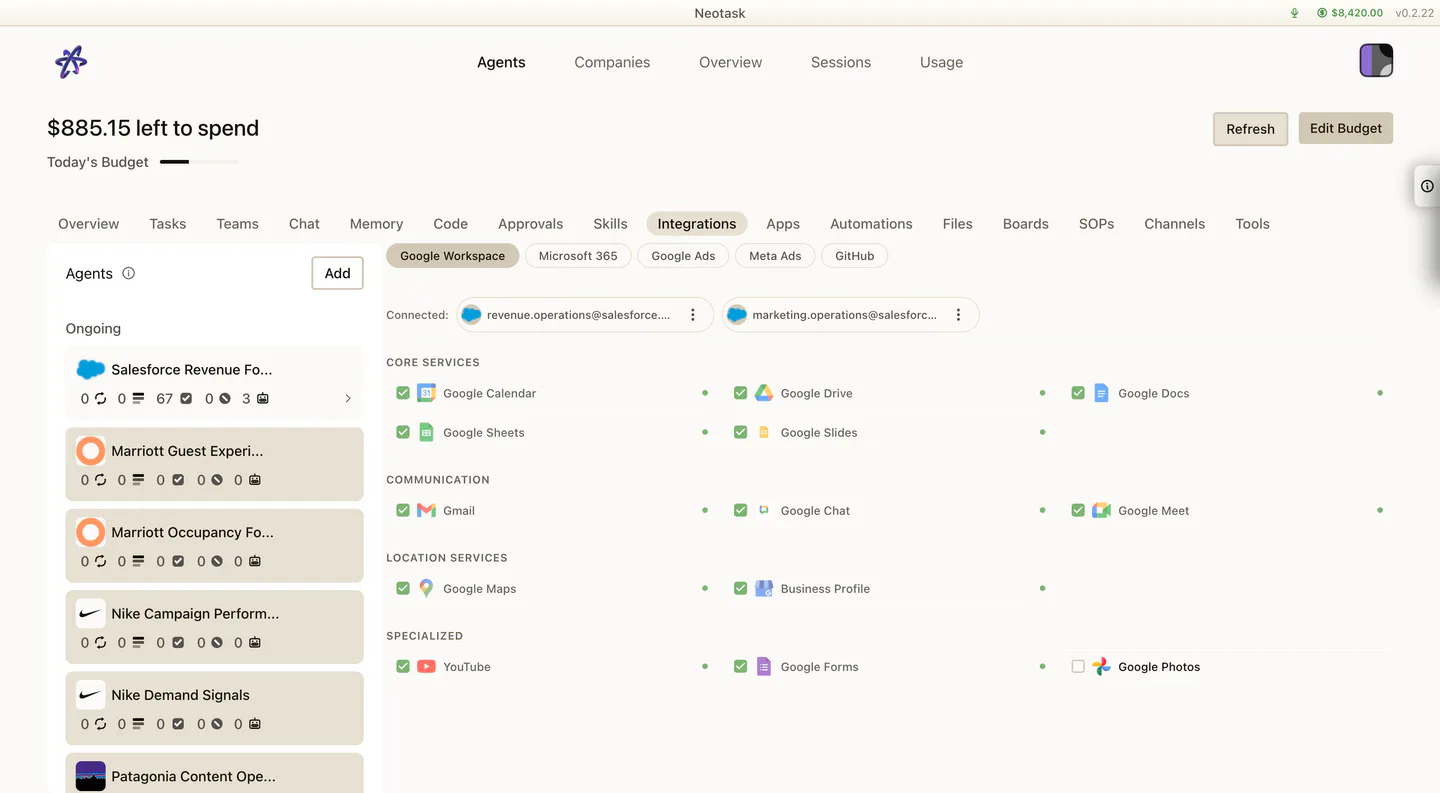
Neotask integrates with 25 Google services across four categories. Connect via OAuth from the Integrations tab or during onboarding.
Core Services
| Service |
Capabilities |
| Gmail |
Read, compose, send, manage labels, search emails |
| Google Calendar |
Create, update, delete events; check availability |
| Google Drive |
Upload, download, organize files and folders |
| Google Docs |
Create, read, edit documents |
| Google Sheets |
Read, write, format spreadsheet data |
| Google Slides |
Create and edit presentations |
| Google Forms |
Create forms, read responses |
| Google Keep |
Create and manage notes and lists |
| Google Tasks |
Create, complete, organize task lists |
Communication Services
| Service |
Capabilities |
| Google People/Contacts |
Read, create, update contacts |
| Google Chat |
Send messages in Spaces and DMs |
| Google Meet |
Schedule and manage meetings |
| YouTube |
Search, manage playlists, upload content |
| Google Photos |
Access and organize photo library |
Location Services
| Service |
Capabilities |
| Places API |
Search for businesses and points of interest |
| Routes/Directions |
Calculate routes and travel times |
| Business Profile |
Manage Google Business listings |
Specialized Services
| Service |
Capabilities |
| Google Classroom |
Manage courses, assignments, students |
| Google Play Developer |
App management and analytics |
| Google AdSense |
Ad revenue reporting |
| Google Ads |
Campaign management and reporting |
Connecting Google Services
- Go to Agents → Integrations tab
- Click on a Google service card
- Authorize via Google OAuth popup
- Grant requested permissions
- Service becomes active immediately
Confirm the account and each enabled Google service on the Integrations page.
Multi-Account Support
- Connect multiple Google accounts
- Switch between accounts per service
- Per-account token management
- Automatic token refresh
AI Model Providers
Neotask supports multiple AI providers. Use our pooled keys (System mode) or bring your own (BYOK mode).
Supported Providers
| Provider |
Models |
Key Type |
| Anthropic |
Claude 4 Sonnet, Claude 4 Opus, Claude 3.5 Haiku |
API Key |
| OpenAI |
GPT-5.1, GPT-4.1, GPT-4.1 Nano |
API Key / OAuth (Codex) |
| Google AI |
Gemini 3 Pro, Gemini 3 Flash, Gemini 2.5 Flash Lite |
API Key |
| DeepSeek |
DeepSeek V3.2 |
API Key |
| OpenRouter |
Multi-model routing (100+ models) |
API Key |
Setting Up a Provider
- Go to Settings or Onboarding → Provider Setup
- Select your provider
- Enter your API key (encrypted with AES-256-GCM)
- Key is verified and stored securely
- Models from that provider become available
Provider Fallback
If one provider is unavailable, the system automatically falls back:
- Primary: Claude Sonnet 4
- Fallback 1: GPT-5.1
- Fallback 2: Gemini 3 Pro
See the Channels documentation for complete details on connecting messaging platforms. Supported platforms include:
- Slack, Discord, WhatsApp, Telegram, Signal, Microsoft Teams, Google Chat, SMS, Email/Gmail, Matrix, Line, Zalo, IRC, iMessage
Plus 6 additional via extensions: Twitch, Mattermost, Nextcloud Talk, Nostr, Feishu/Lark, BlueBubbles
Smart Home
| Integration |
Capabilities |
| Philips Hue |
Control lights, scenes, rooms, schedules |
| Sonos |
Playback control, volume, grouping |
| Eight Sleep |
Temperature control, sleep tracking |
| Camera/Security |
Snapshots, monitoring |
Productivity Apps
| Integration |
Capabilities |
| Notion |
Database operations, page management |
| Apple Notes |
Create and manage notes |
| Apple Reminders |
Task management |
| Bear Notes |
Note management |
| Obsidian |
Vault access and editing |
| Things 3 |
Task management (macOS) |
| Trello |
Board and card management |
| 1Password |
Credential retrieval (CLI) |
| Integration |
Capabilities |
| GitHub |
PRs, issues, workflows, code review |
| Spotify |
Playback control, playlist management |
| Weather |
Location-based weather data |
| PDF Processing |
Extract and analyze PDF content |
| Video Processing |
Frame extraction, analysis |
| Image Generation |
DALL-E powered image creation |
Webhooks
- Receive events via incoming webhooks
- Send results to external URLs
- Configure per-automation or per-channel
- JSON payload format
- Retry on failure
App Integrations: 1200+ Services
In addition to the built-in integrations above, Neotask connects to 1200+ external services
through the Apps tab, letting your agents interact with tools, APIs, and platforms through
natural language.
For the full directory of all 1200+ apps with links to each detail page, see Supported Apps.
Browsing Integrations on the Website
On the homepage at neotask.ai, scroll down to the "1200+ Integrations. One Platform." section. You'll see:
- A dense grid of service logos, each clickable, linking to that integration's detail page at
neotask.ai/integrations/{id}
- 16 category filter chips: hover or click any chip to highlight matching integrations
- Each detail page includes: service logo, category badge, key capability bullets, "What You Can Do" section, "Try Asking" example prompts, "Pro Tips", pricing, and related integrations
Connecting an App Integration
- Open the Neotask desktop app
- Click your agent name in the left sidebar
- Click the Apps tab
- Find the integration by browsing categories or using the search bar
- Click the app card, then click Connect
- Complete the auth flow:
| Auth Type |
What Happens |
| OAuth |
A browser window opens. Sign in to the service, authorize access. Tokens are stored and refreshed automatically. |
| API Key |
An input field appears. Paste your API key. It's encrypted with AES-256-GCM and stored locally. |
| None |
No auth needed; the integration works immediately after enabling. |
Connection Status Reference
| Status |
What It Means |
What to Do |
| Connected |
Auth is valid and the integration is ready to use |
Nothing needed; you're good |
| Pending |
Auth flow started but not yet completed |
Complete the OAuth popup or enter your API key |
| Expired |
Token has expired |
Click Reconnect to re-authorize |
| Error |
Auth failed |
Check the error message; may need to re-enter credentials |
| None |
Not yet connected |
Click Connect to start |
Complete App Integration Directory
Every integration listed below has a dedicated detail page at
neotask.ai/integrations/{id} with full capabilities, example prompts, and pricing.
Productivity (26)
| Integration |
What It Does |
Page |
| Airtable |
Spreadsheet-database hybrid: manage bases, tables, records, views |
→ |
| Anytype |
Local-first knowledge management: pages, objects, relations |
→ |
| Archbee |
Documentation platform: create and manage docs, spaces |
→ |
| Asana |
Project management: tasks, projects, teams, timelines |
→ |
| Atlassian |
Jira + Confluence suite: issues, projects, pages, spaces |
→ |
| Atono |
Workflow automation platform |
→ |
| Backdocket |
Legal practice management: cases, documents, billing |
→ |
| Basecamp |
Team collaboration: projects, todos, messages, schedules |
→ |
| BoldSign |
E-signatures: send, track, manage signature requests |
→ |
| Buildable |
Developer workflow automation |
→ |
| Cal.com |
Open-source scheduling: manage calendars, bookings, availability |
→ |
| ClickUp |
Project management: tasks, docs, goals, dashboards |
→ |
| Coda |
All-in-one doc: docs, tables, automations |
→ |
| Confluence |
Team wiki: spaces, pages, comments, search |
→ |
| Evernote |
Note-taking: notebooks, notes, tags, search |
→ |
| Jira |
Issue tracking: projects, boards, sprints, epics |
→ |
| Linear |
Issue tracking: projects, cycles, teams, labels |
→ |
| Make |
Automation platform: scenarios, modules, connections |
→ |
| Microsoft To Do |
Task management: lists, tasks, reminders |
→ |
| Monday.com |
Work management: boards, items, automations |
→ |
| Notion |
All-in-one workspace: pages, databases, relations |
→ |
| Obsidian |
Markdown knowledge base: vaults, notes, links |
→ |
| Roam Research |
Networked note-taking: pages, blocks, references |
→ |
| Smartsheet |
Enterprise work management: sheets, reports, dashboards |
→ |
| Todoist |
Task management: projects, tasks, labels, filters |
→ |
| Trello |
Kanban boards: boards, lists, cards, checklists |
→ |
| Wrike |
Enterprise project management: projects, tasks, timelines |
→ |
Design (11)
| Integration |
What It Does |
Page |
| 21st.dev |
AI component marketplace |
→ |
| Adobe XD |
UI/UX design: artboards, components, prototypes |
→ |
| Canva |
Graphic design: templates, images, branding |
→ |
| FigJam |
Collaborative whiteboard: brainstorming, diagramming |
→ |
| Figma |
Interface design: files, components, styles, variables |
→ |
| Framer |
Web design and publishing: sites, pages, CMS |
→ |
| InVision |
Design collaboration: prototypes, boards, specs |
→ |
| Miro |
Visual collaboration: boards, widgets, frames |
→ |
| Penpot |
Open-source design: files, components, teams |
→ |
| Sketch |
macOS design tool: artboards, symbols, libraries |
→ |
| Zeplin |
Design handoff: specs, style guides, assets |
→ |
Communication (17)
| Integration |
What It Does |
Page |
| Discord |
Community messaging: servers, channels, messages, roles |
→ |
| Front |
Shared inbox: conversations, comments, assignments |
→ |
| Google Meet |
Video meetings: schedule, join, manage meetings |
→ |
| Infobip |
Omnichannel messaging: SMS, WhatsApp, email, voice |
→ |
| Intercom |
Customer messaging: conversations, users, articles |
→ |
| Knock |
Notification infrastructure: workflows, channels, feeds |
→ |
| Line |
Messaging platform: messages, groups, media |
→ |
| Loom |
Video messaging: recordings, transcripts, sharing |
→ |
| Mailgun |
Email API: send, receive, track, validate |
→ |
| Mailjet |
Email delivery: campaigns, transactional, templates |
→ |
| Microsoft Teams |
Team collaboration: chats, channels, meetings |
→ |
| SendGrid |
Email delivery: transactional, marketing, analytics |
→ |
| Slack |
Team messaging: channels, messages, threads, files |
→ |
| Telegram |
Messaging: chats, groups, bots, channels |
→ |
| Twilio |
Communications API: SMS, voice, video, WhatsApp |
→ |
| WhatsApp |
Messaging: conversations, media, templates |
→ |
| Zoom |
Video conferencing: meetings, webinars, recordings |
→ |
Analytics (12)
| Integration |
What It Does |
Page |
| Amplitude |
Product analytics: events, funnels, cohorts, retention |
→ |
| Audiense |
Audience intelligence: segments, insights, reports |
→ |
| Datadog |
Monitoring: metrics, traces, logs, dashboards |
→ |
| Google Analytics |
Web analytics: traffic, conversions, audiences |
→ |
| Grafana |
Observability: dashboards, alerts, data sources |
→ |
| Heap |
Digital analytics: auto-capture events, funnels |
→ |
| Hotjar |
Behavior analytics: heatmaps, recordings, surveys |
→ |
| Mixpanel |
Product analytics: events, funnels, A/B tests |
→ |
| New Relic |
Observability: APM, infrastructure, logs |
→ |
| Plausible |
Privacy-friendly web analytics |
→ |
| PostHog |
Product analytics: events, feature flags, session recordings |
→ |
| Segment |
Customer data platform: sources, destinations, audiences |
→ |
Sales & CRM (12)
| Integration |
What It Does |
Page |
| Apollo |
Sales intelligence: leads, contacts, sequences |
→ |
| Apollo.io |
B2B data and engagement: prospecting, outreach |
→ |
| Attio |
Next-gen CRM: contacts, companies, pipelines |
→ |
| Clay |
Data enrichment: lead scoring, waterfall enrichment |
→ |
| Close |
Sales CRM: leads, activities, pipelines, calling |
→ |
| Freshsales |
CRM: contacts, deals, accounts, territories |
→ |
| Gong |
Revenue intelligence: call recordings, analytics |
→ |
| HubSpot |
CRM platform: contacts, deals, tickets, marketing |
→ |
| Outreach |
Sales engagement: sequences, tasks, analytics |
→ |
| Pipedrive |
Sales CRM: deals, contacts, activities, pipelines |
→ |
| Salesforce |
Enterprise CRM: accounts, opportunities, reports |
→ |
| Zoho CRM |
CRM: leads, contacts, deals, analytics |
→ |
Development (24)
| Integration |
What It Does |
Page |
| Apify |
Web scraping and automation: actors, runs, datasets |
→ |
| AWS |
Cloud infrastructure: EC2, S3, Lambda, IAM |
→ |
| Azure DevOps |
DevOps: repos, pipelines, boards, artifacts |
→ |
| Bitbucket |
Git hosting: repos, PRs, pipelines, issues |
→ |
| Bitrise |
Mobile CI/CD: builds, workflows, apps |
→ |
| Buildkite |
CI/CD: pipelines, builds, agents |
→ |
| Cloudflare |
Edge platform: DNS, CDN, workers, security |
→ |
| Docker |
Containerization: images, containers, registries |
→ |
| Firebase |
App platform: auth, database, hosting, functions |
→ |
| GitHub |
Code hosting: repos, PRs, issues, actions, releases |
→ |
| GitLab |
DevOps platform: repos, CI/CD, issues, registries |
→ |
| Jenkins |
CI/CD server: jobs, builds, pipelines |
→ |
| JetBrains |
IDE platform: projects, plugins, configurations |
→ |
| JFrog |
Artifact management: repos, packages, security |
→ |
| LaunchDarkly |
Feature flags: flags, environments, segments |
→ |
| Liveblocks |
Real-time collaboration: rooms, presence, storage |
→ |
| MinIO |
Object storage: buckets, objects, policies |
→ |
| Neon |
Serverless Postgres: databases, branches, endpoints |
→ |
| Netlify |
Web hosting: sites, deploys, functions, forms |
→ |
| PlanetScale |
Serverless MySQL: databases, branches, deploy requests |
→ |
| Railway |
Cloud deployment: services, environments, variables |
→ |
| Sentry |
Error tracking: issues, events, releases, alerts |
→ |
| Supabase |
Backend platform: database, auth, storage, functions |
→ |
| Vercel |
Frontend deployment: projects, deployments, domains |
→ |
Databases (8)
| Integration |
What It Does |
Page |
| BigQuery |
Data warehouse: datasets, queries, tables |
→ |
| ClickHouse |
Column-oriented database: queries, tables, inserts |
→ |
| DynamoDB |
NoSQL database: tables, items, queries |
→ |
| Elasticsearch |
Search engine: indices, documents, queries |
→ |
| MongoDB |
Document database: collections, documents, aggregations |
→ |
| PostgreSQL |
Relational database: tables, queries, schemas |
→ |
| Redis |
In-memory database: keys, streams, pub/sub |
→ |
| Snowflake |
Cloud data warehouse: warehouses, databases, queries |
→ |
Data (6)
| Integration |
What It Does |
Page |
| Algolia |
Search API: indices, records, analytics |
→ |
| Astra DB |
Serverless Cassandra: databases, collections, documents |
→ |
| Atlan |
Data catalog: assets, glossary, lineage |
→ |
| Baserow |
Open-source database: tables, fields, rows |
→ |
| Bright Data |
Web data platform: collectors, datasets, proxies |
→ |
| Meilisearch |
Search engine: indexes, documents, facets |
→ |
Finance (13)
| Integration |
What It Does |
Page |
| Adfin |
Financial operations: invoices, payments, reconciliation |
→ |
| Aiera |
Financial intelligence: earnings, transcripts, analysis |
→ |
| Airwallex |
Global payments: accounts, transfers, FX |
→ |
| Alpaca |
Trading API: orders, positions, market data |
→ |
| Alpha Vantage |
Market data: stocks, forex, crypto, indicators |
→ |
| Brex |
Corporate finance: cards, expenses, budgets |
→ |
| Mercury |
Banking: accounts, transactions, payments |
→ |
| Plaid |
Banking API: accounts, transactions, identity |
→ |
| QuickBooks |
Accounting: invoices, expenses, reports |
→ |
| Ramp |
Corporate cards: transactions, receipts, budgets |
→ |
| Square |
Commerce: payments, catalog, customers, locations |
→ |
| Stripe |
Payments: charges, subscriptions, invoices, customers |
→ |
| Xero |
Accounting: invoices, contacts, bank reconciliation |
→ |
Marketing (11)
| Integration |
What It Does |
Page |
| ActiveCampaign |
Email marketing and CRM: campaigns, automations, contacts |
→ |
| Ahrefs |
SEO: site audit, keywords, backlinks, rank tracking |
→ |
| AirOps |
AI workflow automation for marketing |
→ |
| Beehiiv |
Newsletter platform: subscribers, campaigns, analytics |
→ |
| Brevo |
Email marketing: campaigns, contacts, automations |
→ |
| BuiltWith |
Technology profiling: tech stacks, leads, trends |
→ |
| ConvertKit |
Creator email marketing: subscribers, sequences, forms |
→ |
| Customer.io |
Customer messaging: campaigns, segments, workflows |
→ |
| Drip |
E-commerce email: automations, subscribers, campaigns |
→ |
| Klaviyo |
E-commerce marketing: flows, campaigns, segments |
→ |
| Mailchimp |
Email marketing: audiences, campaigns, automations |
→ |
AI & ML (13)
| Integration |
What It Does |
Page |
| AgentOps |
AI agent observability: sessions, events, analytics |
→ |
| Anthropic |
Claude AI: completions, messages, embeddings |
→ |
| Arize Phoenix |
ML observability: traces, evaluations, datasets |
→ |
| Cohere |
NLP API: embeddings, reranking, generation |
→ |
| ElevenLabs |
Voice AI: text-to-speech, voice cloning, dubbing |
→ |
| Hugging Face |
ML platform: models, datasets, spaces |
→ |
| Kagi Search |
Premium search: web search, summarization |
→ |
| Label Studio |
Data labeling: projects, tasks, annotations |
→ |
| OpenAI |
GPT AI: completions, embeddings, images, audio |
→ |
| Pinecone |
Vector database: indexes, vectors, queries |
→ |
| Replicate |
ML inference: models, predictions, deployments |
→ |
| Stability AI |
Image generation: text-to-image, upscaling, editing |
→ |
| Weaviate |
Vector database: schemas, objects, searches |
→ |
Security (9)
| Integration |
What It Does |
Page |
| 1Password |
Password management: vaults, items, secrets |
→ |
| Asgardeo |
Identity management: users, apps, connections |
→ |
| Auth0 |
Identity platform: users, connections, rules |
→ |
| BoostSecurity |
DevSecOps: policies, findings, scanners |
→ |
| CrowdStrike |
Endpoint security: detections, hosts, policies |
→ |
| Dependabot |
Dependency security: alerts, updates, PRs |
→ |
| Snyk |
Security scanning: vulnerabilities, fixes, dependencies |
→ |
| SonarQube |
Code quality: issues, rules, quality gates |
→ |
| Vault |
Secrets management: secrets, policies, auth |
→ |
Infrastructure (8)
| Integration |
What It Does |
Page |
| Aiven |
Managed data services: databases, queues, caches |
→ |
| Ansible |
IT automation: playbooks, inventories, roles |
→ |
| Axiom |
Log management: datasets, queries, dashboards |
→ |
| Azure |
Microsoft cloud: VMs, storage, functions, networking |
→ |
| Chef |
Infrastructure automation: cookbooks, recipes, nodes |
→ |
| Kubernetes |
Container orchestration: pods, services, deployments |
→ |
| Prometheus |
Monitoring: metrics, alerts, queries |
→ |
| Pulumi |
Infrastructure as code: stacks, resources, outputs |
→ |
Storage (7)
| Integration |
What It Does |
Page |
| Backblaze B2 |
Cloud storage: buckets, files, uploads |
→ |
| Box |
Cloud content: files, folders, collaborations |
→ |
| Dropbox |
File storage: files, folders, sharing, sync |
→ |
| Google Drive |
Cloud storage: files, folders, permissions, search |
→ |
| OneDrive |
Microsoft cloud storage: files, folders, sharing |
→ |
| S3 |
AWS object storage: buckets, objects, policies |
→ |
| Wasabi |
Cloud storage: buckets, objects, hot storage |
→ |
Browser (4)
| Integration |
What It Does |
Page |
| Browser Automation |
Automated browsing: navigation, clicks, scraping |
→ |
| Browserbase |
Cloud browsers: sessions, screenshots, recording |
→ |
| Playwright |
Browser testing: pages, selectors, assertions |
→ |
| Puppeteer |
Chrome automation: pages, screenshots, PDFs |
→ |
| Integration |
What It Does |
Page |
| 2Slides |
Presentation creation: slides, templates, exports |
→ |
| AllVoiceLab |
Voice synthesis: voices, speech generation |
→ |
| Cloudinary |
Media management: images, video, transformations |
→ |
| Kaltura |
Video platform: uploads, playback, analytics |
→ |
| Mux |
Video infrastructure: live streaming, VOD, analytics |
→ |
| Spotify |
Music streaming: playback, playlists, search |
→ |
| Vimeo |
Video hosting: uploads, players, analytics |
→ |
| YouTube |
Video platform: search, playlists, channels, uploads |
→ |
Education (5)
| Integration |
What It Does |
Page |
| 10x Genomics |
Genomics data analysis: datasets, experiments |
→ |
| Coursera |
Online learning: courses, certificates, progress |
→ |
| Duolingo |
Language learning: lessons, progress, streaks |
→ |
| Khan Academy |
Free education: courses, exercises, progress |
→ |
| Udemy |
Online courses: enrollments, progress, certificates |
→ |
Other (3)
| Integration |
What It Does |
Page |
| Aqara |
Smart home: sensors, switches, hubs |
→ |
| Baidu Map |
Chinese mapping: geocoding, directions, places |
→ |
| Mapbox |
Maps and location: geocoding, directions, tiles |
→ |
Troubleshooting Integrations
| Problem |
Cause |
Fix |
| Google service shows "Disconnected" |
OAuth token expired or revoked |
Re-authorize in Integrations tab |
| App status shows "Expired" |
MCP OAuth token expired |
Click Reconnect in Apps tab |
| App status shows "Error" |
API key invalid or service unreachable |
Check error message; re-enter credentials |
| OAuth popup doesn't open |
Browser popup blocker |
Allow popups for neotask.ai |
| Integration connected but agent can't use it |
Agent doesn't have the app enabled |
Enable the app in the agent's Apps tab |
| "Not connected" after app restart |
Token refresh failed |
Click Reconnect; tokens persist across restarts normally |
For general troubleshooting, see Troubleshooting.