Teams & Multi-Agent Orchestration
What Are Teams?
Teams are Neotask's multi-agent orchestration system that decomposes complex goals into roles and tasks. When you create a team, an AI planning phase analyzes your objective and builds the optimal team structure automatically. A lead agent then coordinates all subagents and monitors progress through to completion.
Teams are available on the Business and Enterprise plans, with agent count uncapped on every plan. This is the core of what makes the higher tiers powerful: massive parallel orchestration coordinated by the platform.
How It Works
- Describe your objective. Provide a high-level goal (e.g., "Build a landing page for my startup").
- AI analysis. The system analyzes complexity, identifies the required roles, and determines task breakdown.
- Agent assignment. Agents are created and assigned per role (up to 5 roles per team).
- Task decomposition. Your objective is broken down into discrete tasks (up to 8 tasks per project).
- Orchestration. A lead orchestrator agent coordinates everything across all subagents.
- Real-time updates. Status updates stream in as each task completes.
Orchestration Modes
| Mode | Description |
|---|---|
| Parallel | All agents work simultaneously on independent tasks. Best for objectives where tasks have no dependencies on each other. |
| Sequential | Tasks complete in strict order. The output of each task feeds into the next. Best for objectives where each step builds on the previous one. |
| Hybrid | A mix of parallel and sequential execution: tasks fan out in parallel, then merge results at synchronization points. Best for complex objectives with a combination of independent and dependent work. |
Creating a Team
To create a team in Neotask:
- Name and description. Give your team a descriptive name and summary of its purpose.
- Select agents. Choose which agents to include in the team.
- Choose orchestration mode. Pick Parallel, Sequential, or Hybrid based on your workflow needs.
- Define the objective. Write the prompt or objective that the team will work toward.
- Start execution. Launch the team and monitor progress in real time.
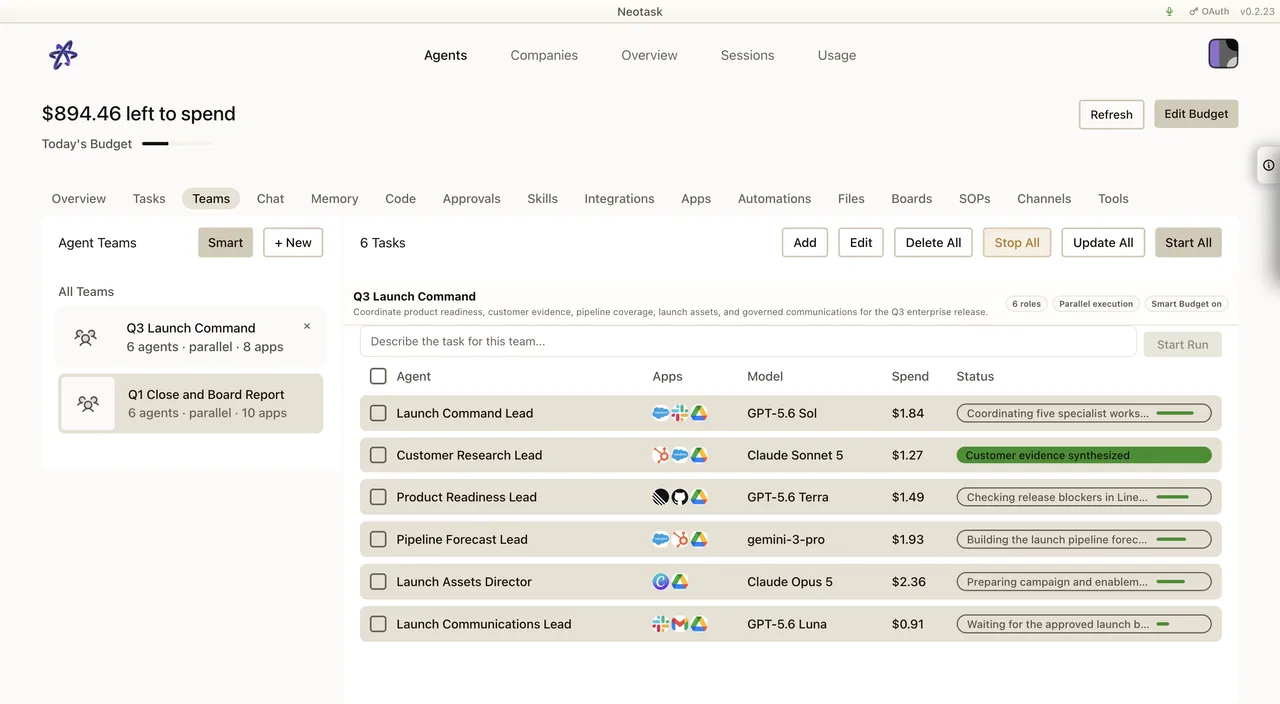
The team table keeps the roster, connected apps, model, spend, and current state together while the run is active.
Task Types & Model Routing
Neotask now uses frontier-only task routing. Team runs no longer route standard coding, documentation, formatting, or simple tasks to older light/medium models such as Claude Haiku, DeepSeek, GPT-4.1 Nano, or Gemini Flash Lite. Every routed task stays on a frontier model at Claude Sonnet 4.6 level or higher, GPT-5 level or higher, or the equivalent top-tier family configured for the workspace.
| Task Type | Model | Tier |
|---|---|---|
| Architecture and critical decisions | Claude Opus 4.7 or GPT-5.5 Pro | Frontier |
| Complex coding and multi-file implementation | GPT-5.5, GPT-5.4, or GPT-5.3 Codex | Frontier |
| Standard coding | Claude Sonnet 4.6 or GPT-5.4 | Frontier |
| Research and analysis | Claude Opus 4.7, Claude Sonnet 4.6, or GPT-5.5 | Frontier |
| Documentation and technical writing | Claude Sonnet 4.6 or GPT-5.4 | Frontier |
| Data extraction and structured reasoning | GPT-5.4 or Claude Sonnet 4.6 | Frontier |
| Simple tasks and formatting | GPT-5+ or Claude Sonnet 4.6, using the lightest approved frontier path | Frontier |
This routing happens automatically based on the nature of each decomposed task. You do not need to manually select models, and Neotask does not degrade team work onto non-frontier fallback models.
Budget-Aware Routing
When budget constraints are active, Neotask intelligently chooses the least expensive approved frontier model that can still handle the task:
- Highest-risk tasks stay on the strongest available frontier model, such as Claude Opus 4.7 or GPT-5.5 Pro.
- Standard operational tasks can shift to lower-cost frontier models, such as Claude Sonnet 4.6, GPT-5.4, or GPT-5.3 Codex.
- Simple tasks use the lightest approved frontier path, but still do not route to legacy light models.
The system also applies provider fallback ordering when a specific model is unavailable or over budget:
Fallback chain: Claude Opus 4.7 → Claude Sonnet 4.6 → GPT-5.5/GPT-5.4 → GPT-5.3 Codex
This ensures your team runs can continue under tight budget constraints while preserving the frontier-only quality bar.
Session Isolation
Each agent in a team operates within its own isolated session:
- No cross-contamination. Agents cannot access or interfere with each other's session data.
- Goal context sharing. The lead agent shares the relevant goal context with each subagent, but nothing more.
- Completion reporting. Real-time completion reports flow back from each subagent to the lead agent, keeping orchestration on track.
This isolation ensures that agents work independently and reliably without side effects from other agents in the same team.
Team Runs
Neotask tracks every team execution as a run. From the team runs view, you can:
- View run history. See past runs with their status, duration, and results.
- Start and stop runs. Launch new executions or halt runs in progress.
- Monitor individual agent progress. Track what each agent is working on and how far along it is.
- Task cascade. Completion of one task automatically triggers any dependent tasks, keeping the workflow moving without manual intervention.
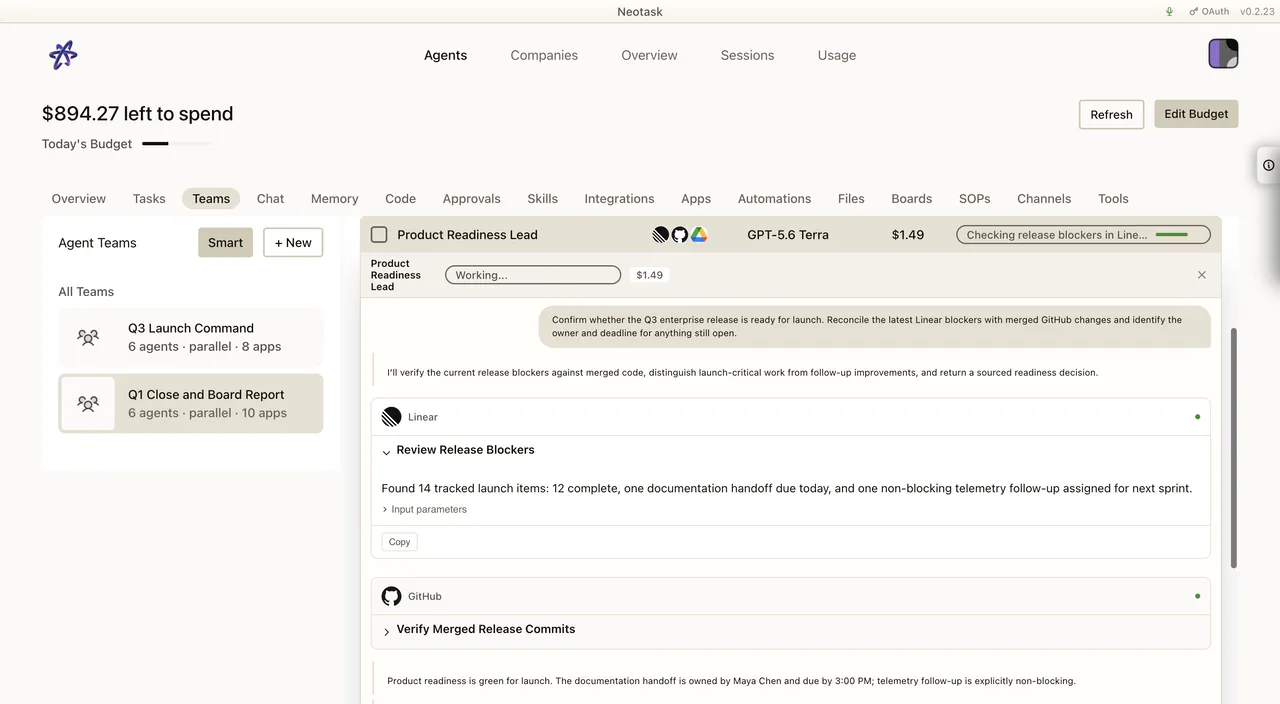
Open the active run to read the team conversation, app activity, and work returned by each agent.
Scaling with Enterprise
Enterprise plans are designed for teams that need to run complex, multi-agent workflows at scale:
- Uncapped concurrent agents. Deploy as many agents as your workflows need, working in parallel across different teams and objectives.
- Usage-based pricing. You pay the platform subscription for the orchestration infrastructure, and usage fees are billed based on actual token consumption across all agents. This means you only pay for the compute your agents actually use.
- Per-agent budgets. Set individual spend limits on every agent to maintain cost control even at scale.
- Smart routing. Automatic model selection ensures each task uses the most cost-effective model capable of handling it.