Nightly Rundown
Review Tomorrow's Work
- Open Nightly Rundown from the company workspace.
- Review completed work, unresolved items, and suggested tasks.
- Approve or edit work that requires a person.
- Open Plan to see the resulting schedule.
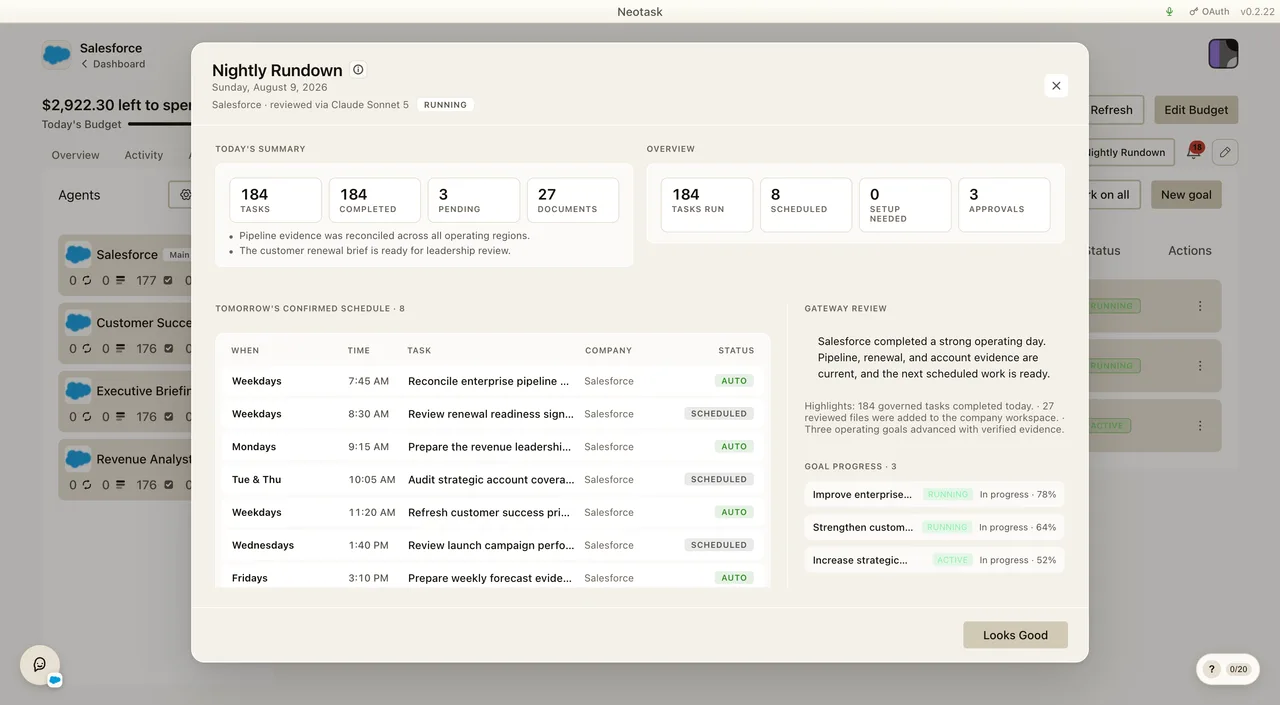
The Nightly Rundown is your company's end-of-day briefing. Once a day it reviews everything your autonomous company did, checks that tomorrow's work is ready to run, and gives you one place to approve any extra work the AI found outside your fixed plan, so you can glance at a single screen instead of digging through tasks, approvals, and activity separately.
In the app's own words: "Nightly Rundown reviews today, checks tomorrow's task readiness, and gives you one place to approve dynamic work the gateway found outside the fixed plan."
Note: The Nightly Rundown is part of a feature rollout and is controlled by a per-company notification setting, so it may not be switched on for every company yet. Everything below describes how it behaves when it's enabled.
When It Runs
The Nightly Rundown is generated nightly at your configured time, 9:00 PM in the company's local time by default, and you can change that time (see Turning It On & Setting the Time below).
It reaches you in three ways:
- On schedule. After a task finishes and it's past your nightly time, Neotask generates that night's rundown automatically.
- On demand. Clicking the Nightly Rundown button on the company dashboard opens it immediately. If that night's review hasn't been generated yet, the app kicks off the review in the background while you read.
- Once per day. The rundown is built once for each upcoming day. Reopening it shows the same review for tomorrow rather than generating a new one each time.
What It Reviews
Before it shows you anything, the Nightly Rundown gathers your company's real activity from the last 24 hours, it never invents a summary. For each company it reads:
| It looks at | So it can show you |
|---|---|
| Tasks that ran (from your authoritative task-run history) | How many tasks succeeded and how many failed |
| Files & documents created | What your company actually produced today |
| Approvals processed + items still waiting | What's been decided and what still needs you |
| Requires-action items | Anything blocking a task until you act |
| Today's activity & errors | Highlights worth knowing and problems to look at |
| Your live schedule (real scheduled jobs) | Exactly what is set to run tomorrow |
| Connected vs. disconnected integrations | Apps that are broken or expired and could stall tomorrow's work |
| Your active plan | The fixed work tomorrow is built around |
| Billing context | Today's task-fee spend, your credit balance, and any tasks blocked for balance |
Every billing read is safeguarded, if it can't be loaded, the rundown still shows everything else rather than failing.
What You See
The Nightly Rundown opens as a single modal with a few clear sections:
- Today's Summary, Tasks, Failed, Pending, and Documents counts, plus short highlight chips (e.g. "12 tasks completed," "3 files created," "$0.42 in task fees") and error chips (e.g. "2 tasks failed or blocked," "1 action item needs attention").
- Overview, Tasks Run, Scheduled, Setup Needed, and Approvals at a glance.
- Tomorrow's Confirmed Schedule / Task Readiness, a list of what's set to run tomorrow, each with a color-coded readiness label (explained below). The header reads "Task Readiness" when some tasks still need setup or approval. Click any row to jump straight to that task.
- Requires Your Action, tasks paused until you do something (connect an app, make a decision).
- Pending Approvals, approve or deny each one individually, or Approve All / Deny All at once. Approvals never expire, so nothing is lost if you wait.
- Gateway Review, the AI's written summary of the day, plus Highlights and Watchouts. If the review is still generating, you'll see a "not ready yet" state.
- Suggested Tomorrow Work, cards for extra work the AI found outside your fixed plan (explained below).
- Looks Good, a single button to dismiss the rundown when you're done.
The header also shows the date, the company name, and which AI model produced the review.
Tomorrow's Readiness Labels
Each task set to run tomorrow gets a label so you know, at a glance, whether it will just run or whether it will wait for you:
| Label | What it means |
|---|---|
| Auto | Runs without asking. The company (or this task) is set to auto-approve, or the task is low-risk enough to run on its own. |
| Scheduled | Will run as planned, no approval needed. |
| Likely Approval | Will probably ask for your OK first, the company is in a supervised mode, or the task is higher-risk or set to always require approval. |
| Pending Approval | An approval is already waiting for this task right now. |
| Ready / Setup Needed / Blocked | Runtime states the app adds, ready to go, needs an app connected first, or currently blocked. |
These labels are derived from your real autonomy settings and live approval records, so they reflect what will actually happen, not a guess.
Suggested Tomorrow Work
Open Tasks after accepting suggested work to review how it changed the current plan.
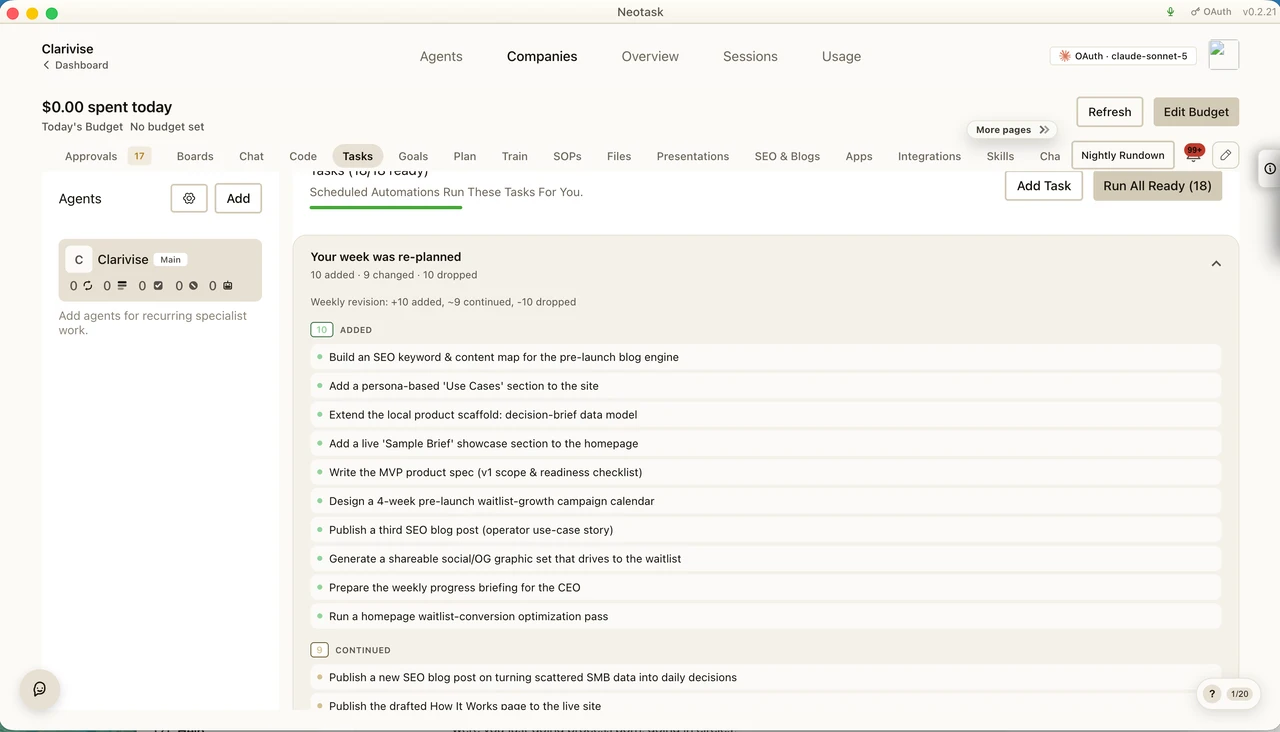
This is what makes the Nightly Rundown more than a summary. The AI reviews your company and proposes net-new work it thinks is worth doing that isn't already in your fixed plan. These are recommendations, not approvals, nothing runs just because it's suggested. Each card explains why it's suggested, how likely it is to need your approval, and which screen it opens if you want to act on it.
Suggestions come in seven kinds:
| Type | What it suggests |
|---|---|
| Plan gap | Useful work your fixed plan missed |
| Follow-up | A natural next step to something that already happened |
| Integration fix | A disconnected or broken app to reconnect before it blocks tomorrow's work |
| Analysis | A one-off analytical or diagnostic task |
| Content opportunity | A content or SEO opportunity to capitalize on |
| Approval follow-up | A recurring approval pattern that could become a standing rule, so you stop being asked the same thing |
| Risk review | A prompt to investigate failed, blocked, or error events |
Each suggestion also carries a priority (low / medium / high) and an approval likelihood (none / maybe / likely) so you can triage quickly.
How It's Generated
The Nightly Rundown is produced by a real, read-only AI review running on Neotask's gateway. The review is explicitly read-only, it can inspect your live tools, connected apps, and activity, but it never changes anything or runs a task on its own. It returns a structured summary, highlights, watchouts, and up to six suggested-tomorrow-work items, and it self-corrects if its first draft comes back malformed.
The review uses whichever AI model your company is set to use. If the gateway review isn't available, Neotask falls back to a server-side generation path across multiple AI providers, and finally to a deterministic (non-AI) set of suggestions built straight from your requires-action items, pending approvals, disconnected integrations, and recent errors, so you always get a useful rundown, even when no AI is available.
Each rundown is saved to your account (the database is the source of truth), so it's consistent across devices and kept as a record.
Turning It On & Setting the Time
The Nightly Rundown is controlled in Notification Preferences:
- A Nightly Rundown toggle turns the nightly summary on or off.
- A time picker sets when it's generated each night (default 9:00 PM, company-local).
"Receive a nightly summary of all activity, tasks run, and pending items."
When it's off, no nightly summary is generated automatically, though you can still open the Nightly Rundown button on demand at any time.
Related
- Approvals & Safety, how approvals, autonomy modes, and risk levels decide what runs on its own
- Planning & Weekly Updates, the fixed weekly plan the rundown checks readiness against
- Company Dashboard, where the Nightly Rundown button lives