Neotask Company Dashboard Tab Map
Main Company Surfaces
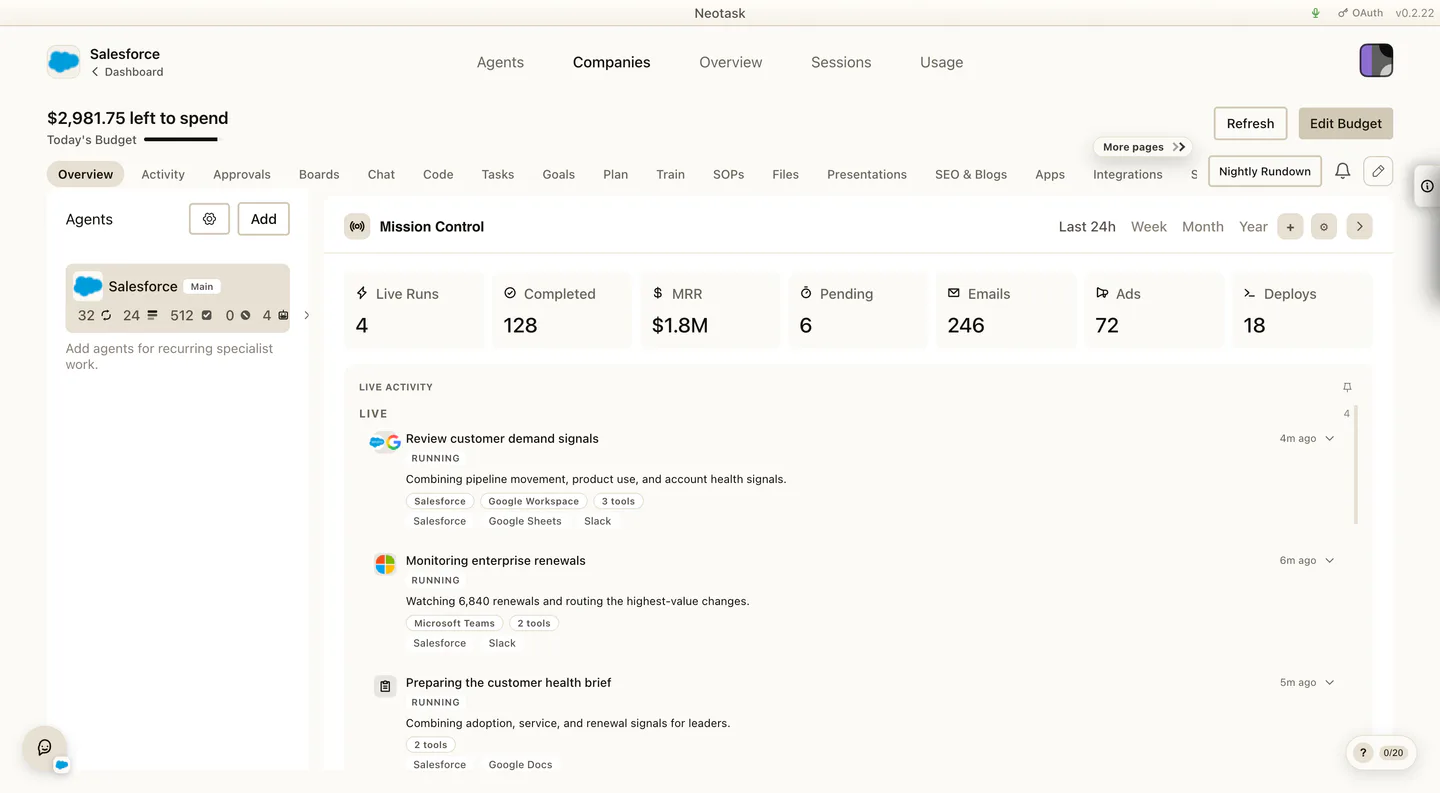
Use this page when the caller says:
- “I cannot find the right company page.”
- “Which tab is this under?”
- “I am already in the company, but I do not know where to go next.”
Core Navigation
The base path is:
- Click Auto
- open the company
- use the company tabs and controls
Current Company Tabs
The current company tab bar includes:
- Overview
- Activity
- Chat
- SOPs
- Approvals
- Plan
- Tasks
- Files
- SEO & Blogs
- Apps
- Employees
- Profile
- Integrations
- Channels
- Skills
- Memory
- Usage
- Settings
Outside the tab bar, the company view also includes:
- Nightly Rundown
- the left-side Controls rail
- right-side quick stats
- the mini calendar
- the notification bell
- the floating company chat widget
What Each Tab Is For
Overview
Use Overview for the high-level operating picture.
Support should route here when the caller wants:
- the big-picture state of the company
- overview widgets
- widget pinning or widget customization
- a quick way to jump into the deeper problem area
Activity
Use Activity for recent and live operational history.
Route here when the caller wants:
- recent company events
- live operating context
- readable activity history before deeper troubleshooting
Chat
Use Chat for the company’s manual chat surface.
Route here when the caller wants to talk directly inside that company rather than use the broader agents chat surfaces.
SOPs
Use SOPs for company operating guidance and the company’s operating playbook.
Route here when the caller wants:
- playbooks
- procedures
- reference docs that teach the company how to work
- to upload or write an SOP themselves (including dictating one with Create with Voice)
- to review an SOP an agent proposed and approve, edit, or discard it
- to manage and keep the company’s operating guide current
Support notes for this tab:
- An SOP an agent proposes arrives as a pending draft and is not active guidance until a person publishes it. When a draft updates an existing SOP, the review shows a diff so the caller can see exactly what changed before approving.
- Callers do not assign SOPs to tasks. When an agent starts work, the company automatically attaches the SOPs most relevant to that task. If a caller reports an agent “isn’t using my SOP,” first confirm the SOP is published and in the right company, then see the troubleshooting pointer below.
For “agent isn’t using my SOP” / “my SOP isn’t showing up,” route to Neotask SOP Retrieval Troubleshooting.
Approvals
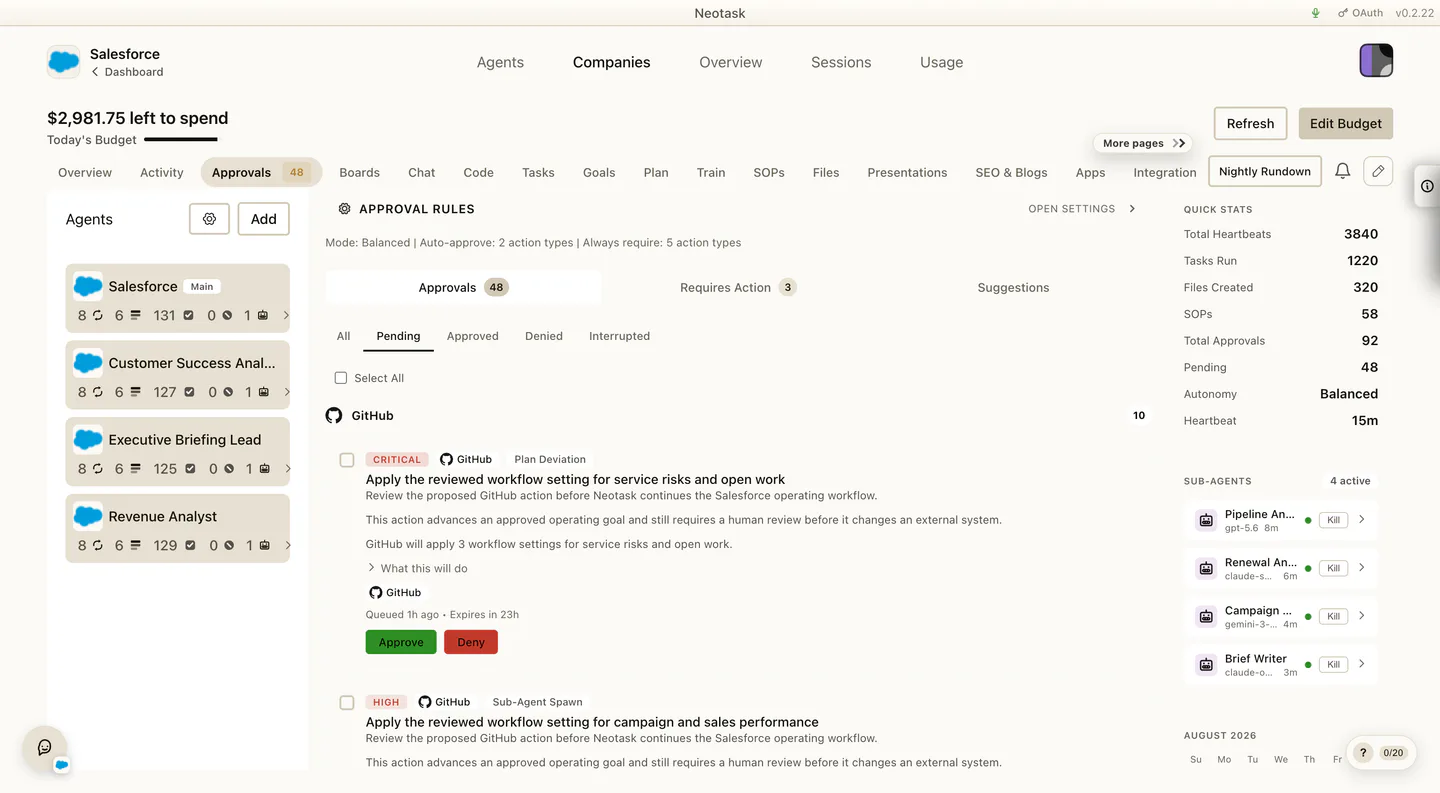
Use Approvals for:
- the approval queue
- company approval settings
Route here when the caller wants:
- to approve or deny waiting work
- to change company approval behavior
- to tighten or loosen app-level approval policy
Plan
The Plan screen shows the current schedule and operating controls. Use it for questions about when company work runs.
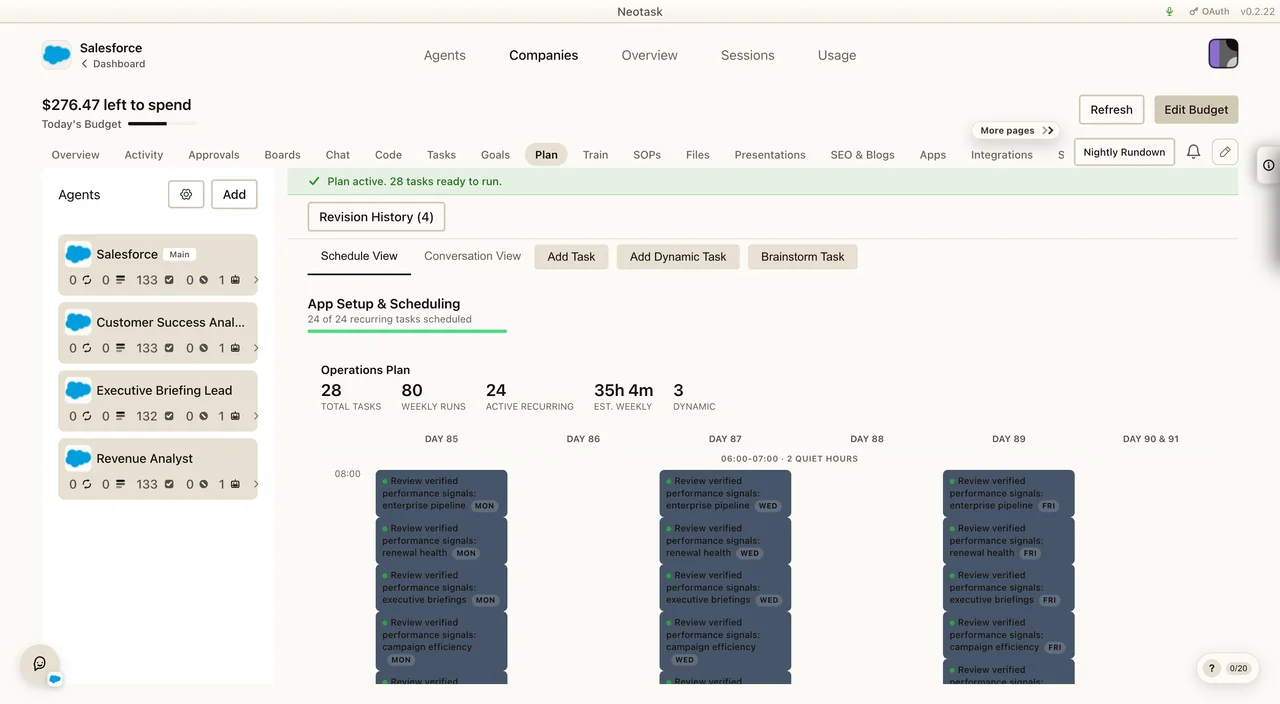
Use Plan for the main company plan.
Route here when the caller wants:
- the generated plan
- schedule visibility
- post-onboarding setup work
- plan refinement
Important support note:
After onboarding, callers are sent into the company on the Plan tab. If they say “I just finished onboarding and now I’m in the company,” this is usually the first surface they are looking at.
Tasks
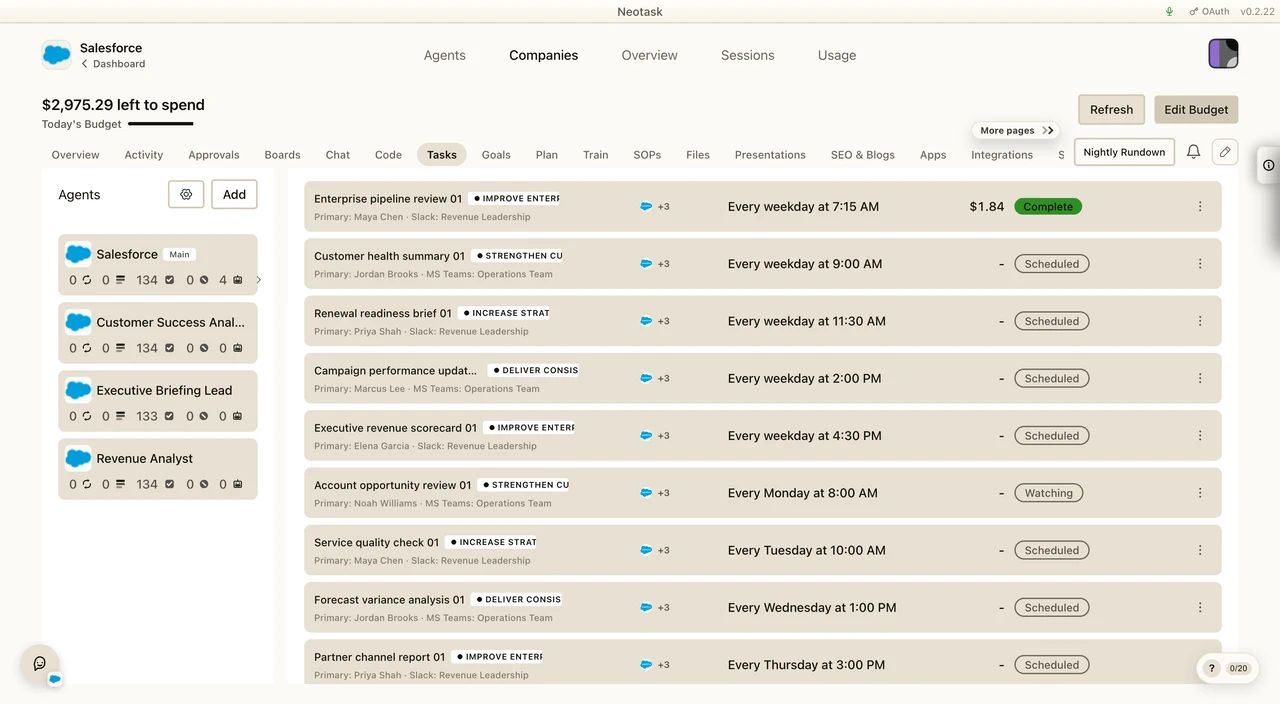
Use Tasks for one-task-at-a-time management.
Route here when the caller wants:
- task editing
- runtime state per task
- task-level assignment changes
- task-level settings such as channels, employees, or approvals
Files
Use Files for the company file library and generated artifacts.
Route here when the caller wants:
- previews
- downloads
- file search
- generated output
- website-related files
- managed website preview/live links
- website source editing or redeploy actions
SEO & Blogs
Use SEO & Blogs for content operations.
Route here when the caller wants:
- headline generation
- article generation
- SEO settings
- SEO usage
Apps
The Apps screen shows connected and available services for company agents. Open it for authentication or tool-access questions.
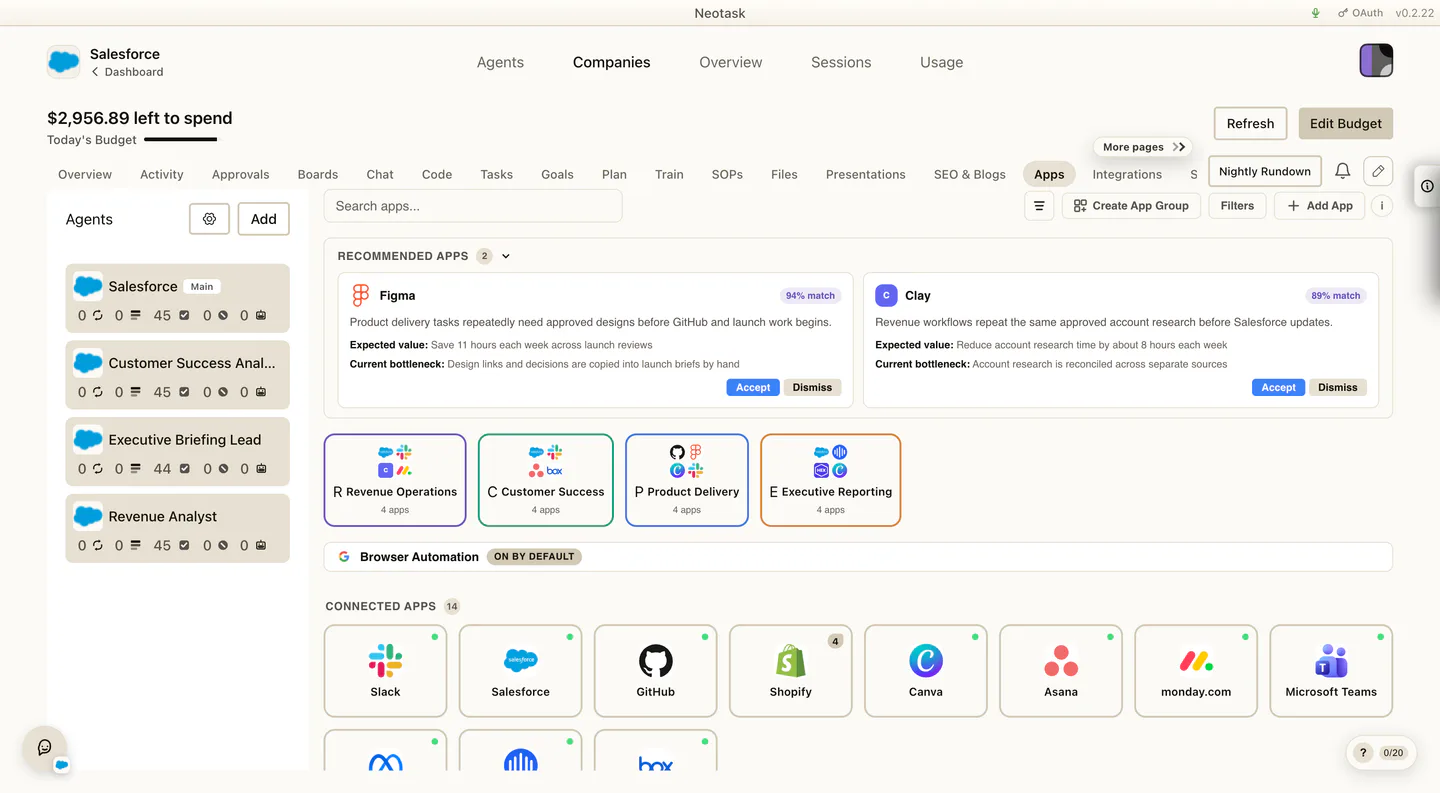
Use Apps for company app recommendations and company app connections.
Route here when the caller wants:
- company app auth
- company app groups
- provider setup that belongs to the company app surface
Employees
Use Employees for the real people tied to the company.
Route here when the caller wants:
- employee records
- contact routing
- employee notes
- channel-linked employee coverage
Profile
Use Profile for core company identity and company details.
Route here when the caller wants:
- profile edits
- company stage
- build/manage mode
- logo changes
- website re-analysis
Integrations
Use Integrations for company Google Workspace services.
Route here when the caller wants:
- Gmail
- Google Docs
- Google Sheets
- Google Drive
- Google Calendar
Channels
Use Channels for the company delivery routes.
Route here when the caller wants:
- to add or edit channels
- to review bindings
- to manage company phone routes
Skills
Use Skills for the company skill-management surface.
Memory
Use Memory for longer-lived company context.
Route here when the caller wants:
- boot memory
- memory categories
- generated memory files
- persistent company context
Usage
Use Usage for company-level consumption review.
Route here when the caller wants:
- company cost review
- company activity windows
- charted usage history
- counter breakdowns and company-level consumption trends
Settings
Use Settings for company-level settings panels.
Route here when the caller wants:
- heartbeat settings
- company approval settings
- adaptive learning
- notification preferences
- public live settings
Quick Decision Rules
- If the caller needs Gmail, Docs, Sheets, Drive, or Calendar for the company: use Integrations
- If the caller needs a company app connection: use Apps
- If the caller needs the approval queue or approval policy: use Approvals
- If the caller needs one task: use Tasks
- If the caller needs the whole operating plan: use Plan
- If the caller needs company files or website-related files: use Files